Home
Our ressources
Omnichannel consistency
&
Franchise networks
Endcaps: how to turn them into a real sales driver

End-cap displays: how to turn them into a real sales driver

Published on
00
min read
Omnichannel consistency
Franchise networks
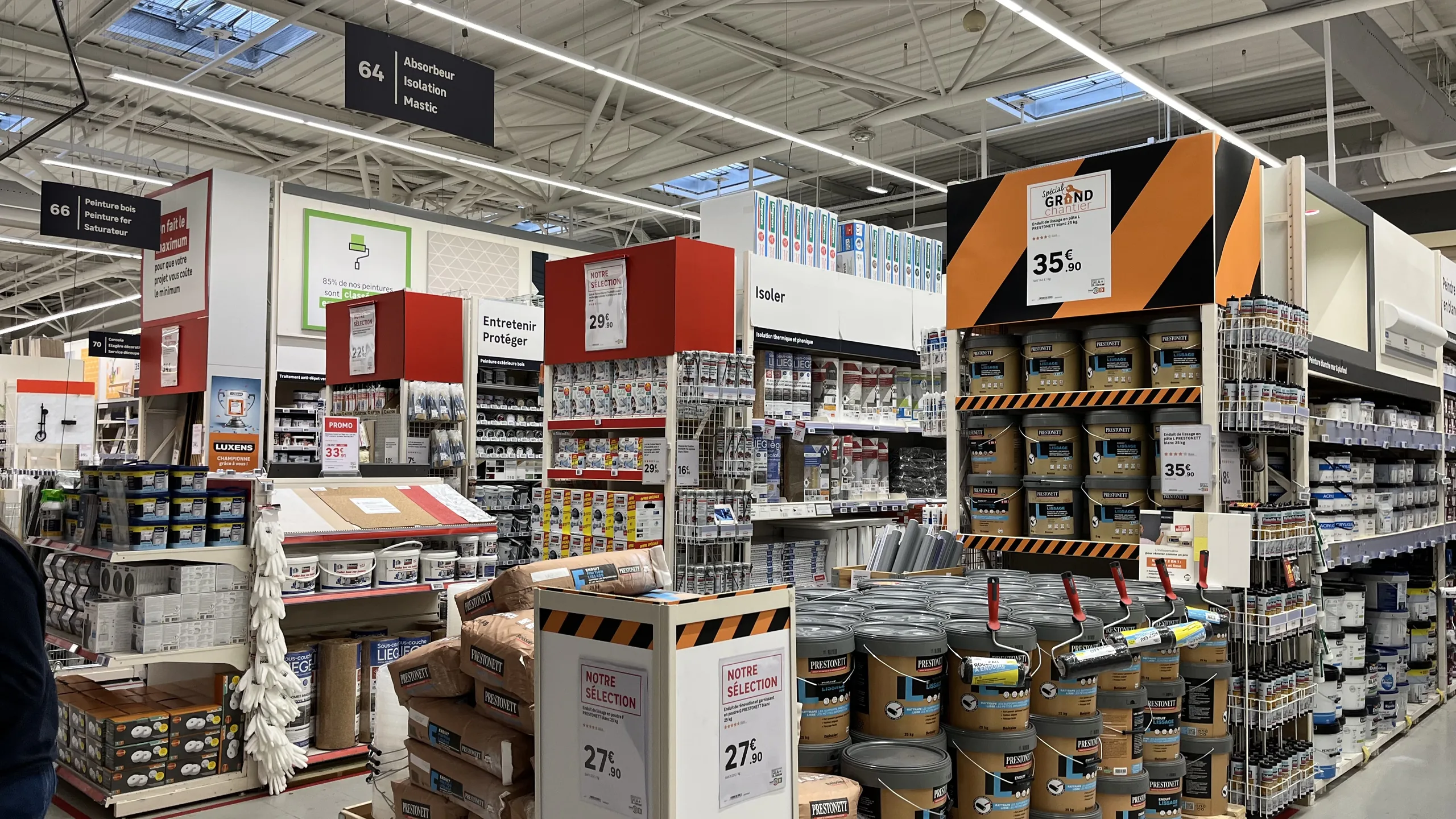
Allée principale d'un magasin de bricolage bordée de têtes de gondole avec frontons de couleur et affiches prix
Table of contents

How can you ensure visual consistency across a retail chain?

As one of the most visible spots in the store, an end-cap only sells if its signage is clear and accurate. Definition, materials, message hierarchy, compliant strike-through pricing, and ensuring consistency across an entire network.

What is an end-cap display?An end-cap is the end of a shelving unit (the gondola) placed facing the store's main aisle. It is one of the most visible locations in the retail space: it is used to highlight promotions, new arrivals, or seasonal products. An effective end-cap makes it clear at a glance what is being featured and why, using a hierarchical display and the right price.

In a large retail store, few locations are as coveted as the end-cap. Customers pass by them as they move through the main aisle, and the products displayed there enjoy a level of visibility that the rest of the aisle cannot offer.
However, not all end-caps drive sales. Some catch the eye and trigger a purchase; others simply pile up products under contradictory signs. The difference rarely lies in the furniture itself. It mainly comes down to the signage: what it says, how it prioritizes information, and whether the price it advertises is correct.

What is an end-cap display?

A gondola is the shelving unit that forms the aisles of a store. Its end is the extremity that faces the main aisle, perpendicular to the shelving run. It is thus distinct from the aisle end, located at the end of the aisle, and the standard shelving, where products are arranged along the shelves.
The expression "end-cap" has even entered common parlance to refer to anything highlighted or in the foreground. In-store, the location is primarily used to:

  • Highlight a sales campaign : promotions, low prices, catalogs, or sales.
  • Launch a new product or an exclusive item.
  • Support a seasonal event : back-to-school, gardening, holidays, or heating.
  • Create a display that brings several products together around a single use.

What distinguishes an effective endcap from an unsuccessful one

An effective endcap makes it clear at a glance what is being highlighted and why. The signage must catch the eye from the aisle, then allow the customer to identify the products and their prices without hesitation.
A highly visible promotional price, potentially accompanied by a strikethrough price when the promotion justifies it, can be very effective. But if every product, every price, and every message tries to grab attention equally, the whole display becomes difficult to read. The customer no longer knows where to look and simply walks on by.
An endcap also loses its effectiveness when:

  • The materials contradict each other : a sign announces a discount, but the product label shows a different price.
  • A price is outdated : the promotion has changed, but the sign remains.
  • Materials are cluttered without a clear theme : signs for different promotions, mismatched formats, or inconsistent branding.

The golden rule: prioritize your signage

A readable endcap works like a magazine page: a headline, then the details. A large sign presents the promotion or a theme that brings several products together; smaller signs provide information specific to each item (name, features, price).
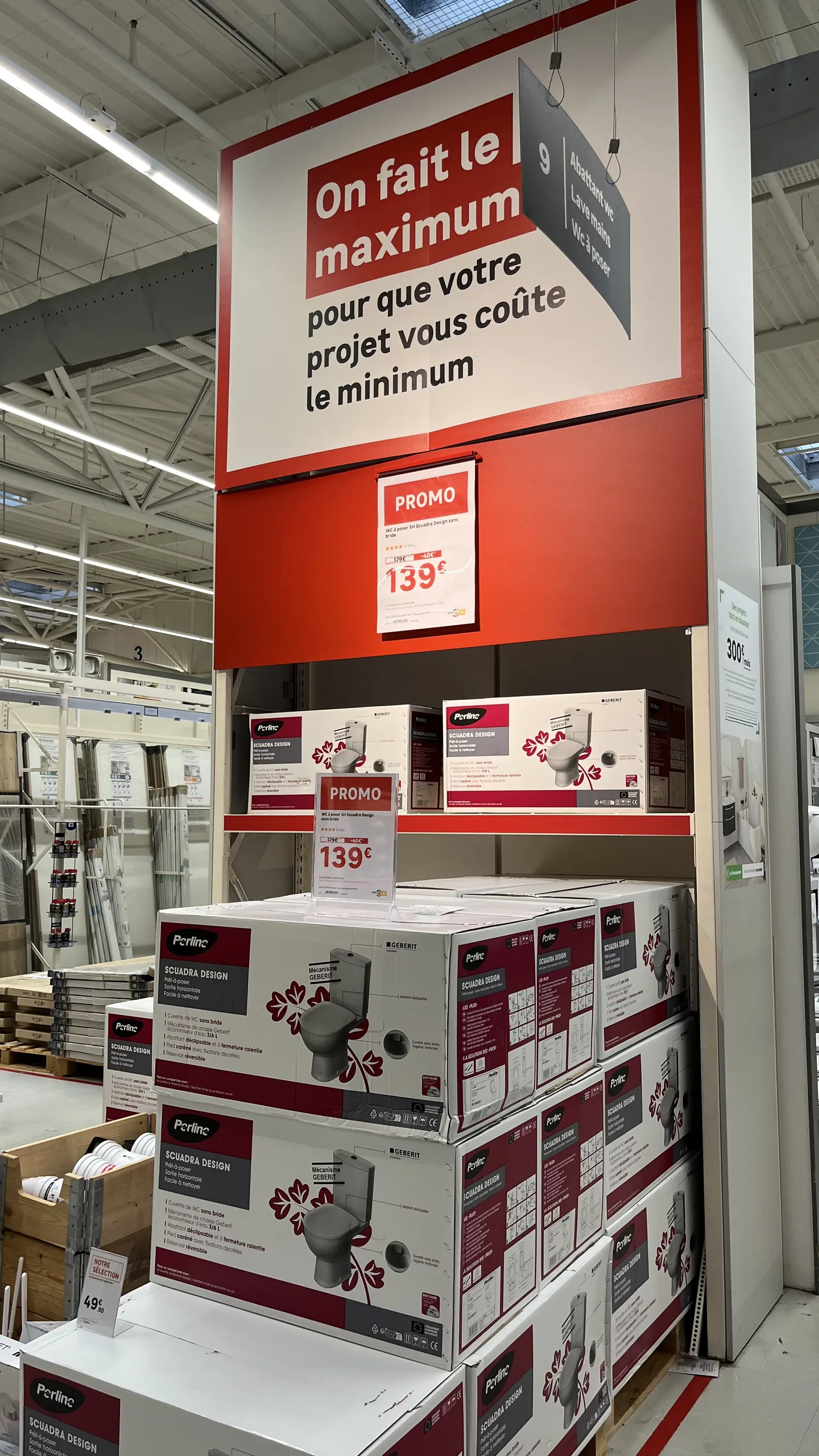
Tête de gondole avec un grand fronton de message, une affiche promotionnelle au prix visible et des étiquettes prix sur les produits
The header carries the message, the poster promotes the price, and the label provides the details: three levels of information.

This hierarchy is not just a matter of graphic design. Marketing, merchandising, purchasing, and store teams must share the same logic: what is the main message, which products are being highlighted, and which medium carries which information. Without this common logic, everyone adds their own sign, and the endcap becomes a patchwork.

Endcap display materials

Terminology varies significantly from one retailer to another: the same material may be called a header, a banner, or a sign depending on the network. Here are the main materials found on and around an endcap.

Signage
Purpose
Typical content
Gondola end header or banner
PurposeAnnounce the campaign or theme, visible from the aisle
Typical contentCampaign name, message, mood image
Promotional poster
PurposeHighlight the main offer
Typical contentPromotional price, compliant was-price, offer mechanics
Product price sign
PurposeGive the price and key facts for each item
Typical contentProduct name, price, key features
Shelf price label
PurposeGuarantee the exact price next to the product
Typical contentPrice, unit price, mandatory information
Shelf wobbler (stop-rayon)
PurposeCatch the eye on a specific product
Typical contentShort hook, price or benefit
Side panel
PurposeExtend the message to the sides of the unit
Typical contentCampaign theme, images, advice
Roll-up, banner or large print
PurposeSignal the campaign from a distance, in large format
Typical contentShort message, headline price, image
Names vary from one retailer to another: header, banner or topper can refer to the same item.

Other materials often complement the display: small poster, product label, shelf edge strip or shelf talker, endcap back panel, endcap base wrap, aisle flag, advice card, product sales sheet, promotional sticker, floor decal or pallet skirt for products displayed on pallets.
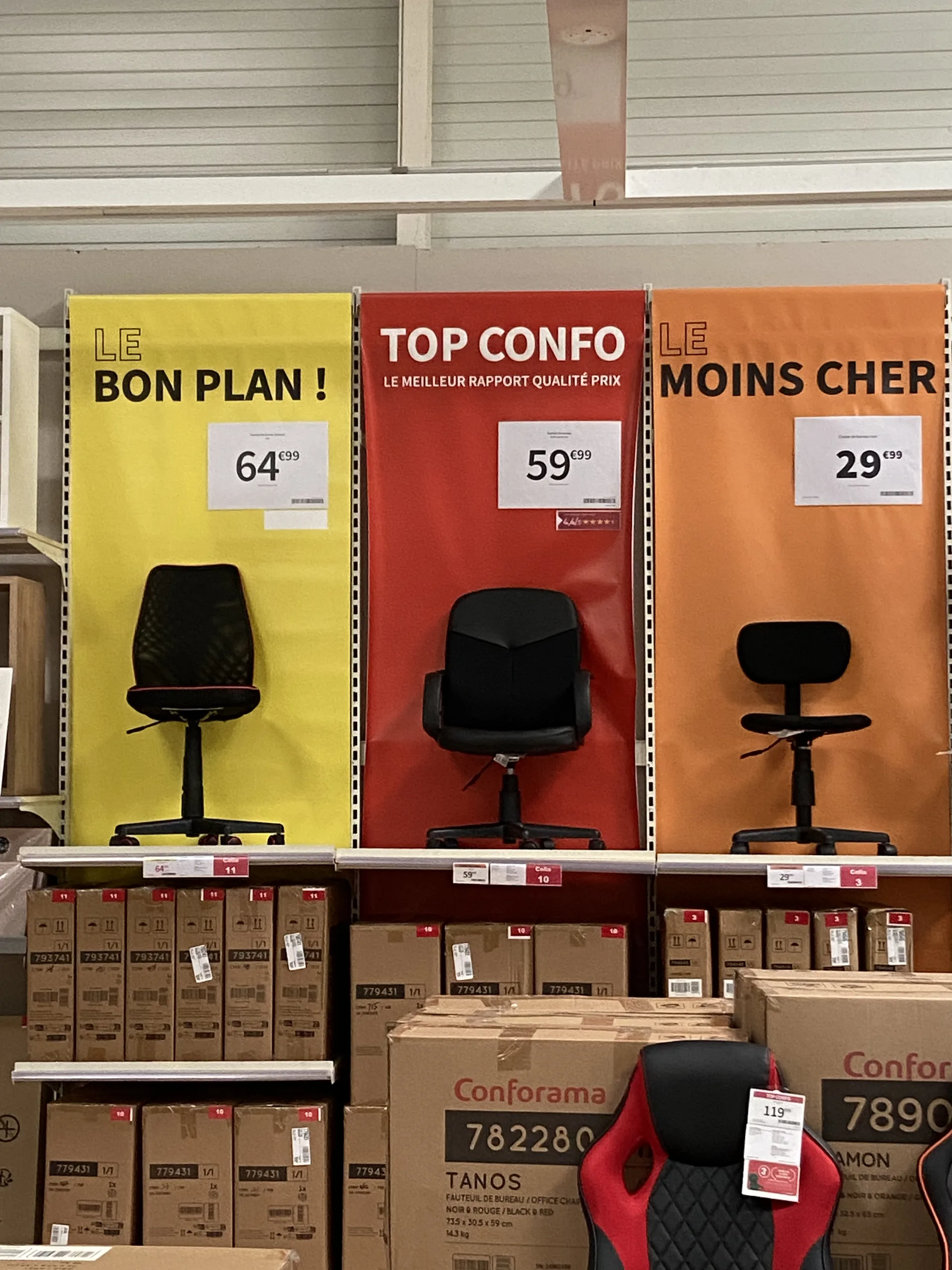
Trois kakémonos de couleurs différentes au-dessus de fauteuils de bureau, chacun avec un message et une affiche prix
Three messages, three colors, one price per product: a display that is easy to read from the aisle.

Price: the information you can't afford to miss

In such a high-visibility location, graphic consistency matters, but the accuracy of the displayed price matters just as much. An incorrect price on an endcap is seen by every customer walking down the aisle, creating an immediate discrepancy at checkout.
Strikethrough pricing requires special attention. Under the European "Omnibus" Directive, any price reduction announcement must indicate the prior price, meaning the lowest price charged during the 30 days preceding the reduction (Article L112-1-1 of the French Consumer Code). A promotional endcap sign must therefore be based on a reliable price history, not on manually re-entered figures. To learn more, see our article on the most common in-store pricing errors.
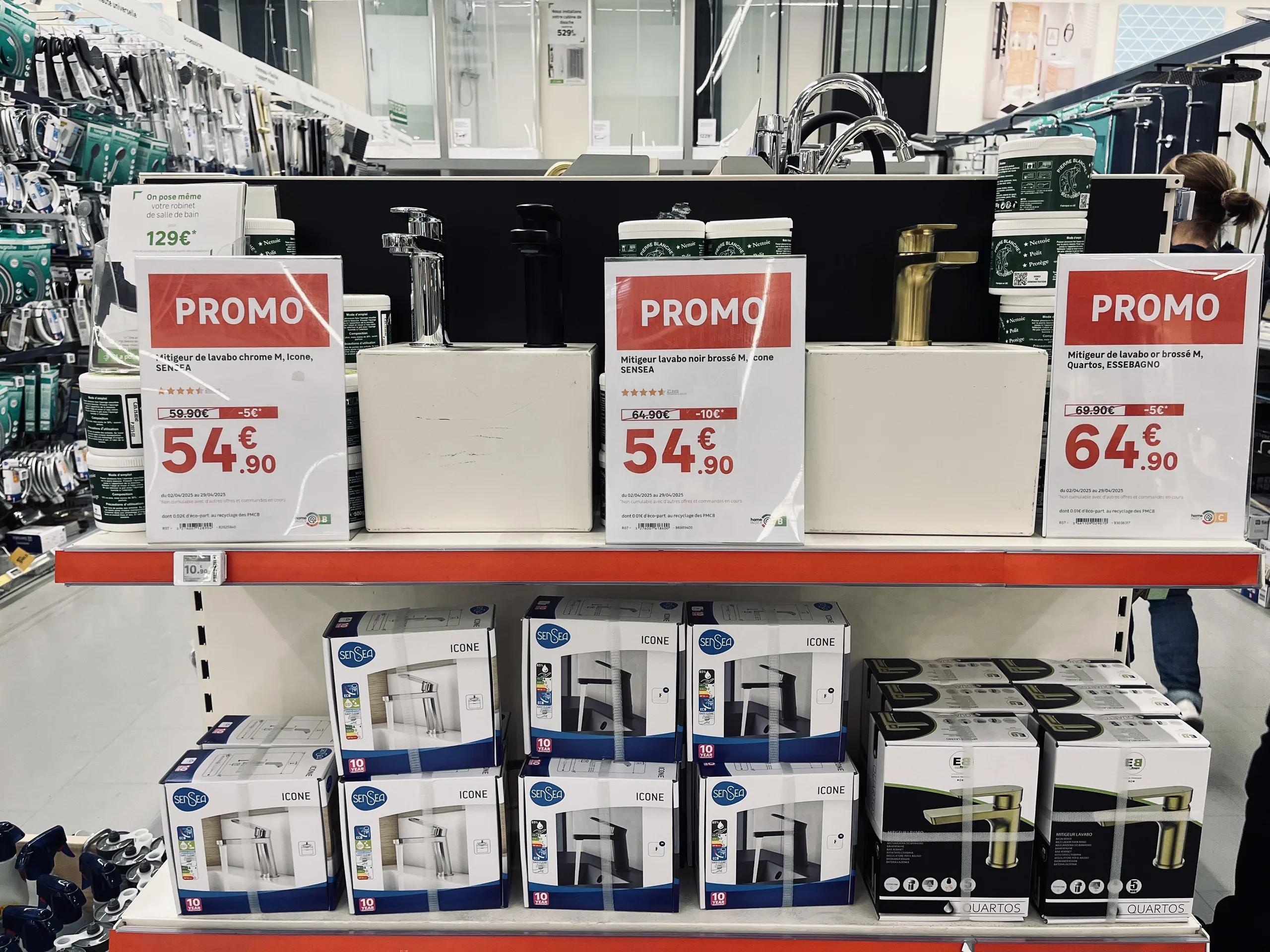
Affiches promotionnelles avec prix barré et prix remisé au-dessus de mitigeurs exposés en tête de gondole
Strikethrough price, discounted price, product description: on a promotional sign, every piece of information must come from the data.

Maintaining a consistent campaign across an entire network

In a retail chain, the challenge scales up: the same campaign must be rolled out across dozens or hundreds of locations, where endcaps vary in both size and layout.
The successful method relies on a clear division of roles:

  1. Headquarters defines the framework : the products or campaigns involved, the messaging, the graphic guidelines, and the display templates.
  2. The store adapts to its layout : the staff selects the specific items being featured and chooses the appropriate formats for each product based on the available endcap space.
  3. Data powers the materials : prices, product information, and campaign terms are pulled directly from the retailer's systems, with no manual re-entry.
  4. Price changes are flagged : when a price changes, the team is alerted and can immediately produce an updated display.

This is how a platform like PiiVO POSter : promotional products and their corresponding templates are made available to stores, which then assemble their end-cap displays within a shared framework. The displays maintain a consistent brand identity everywhere, while still accounting for differences between individual stores. Naturally, the installation and monitoring of shelf materials remain part of the store's operational workflow.
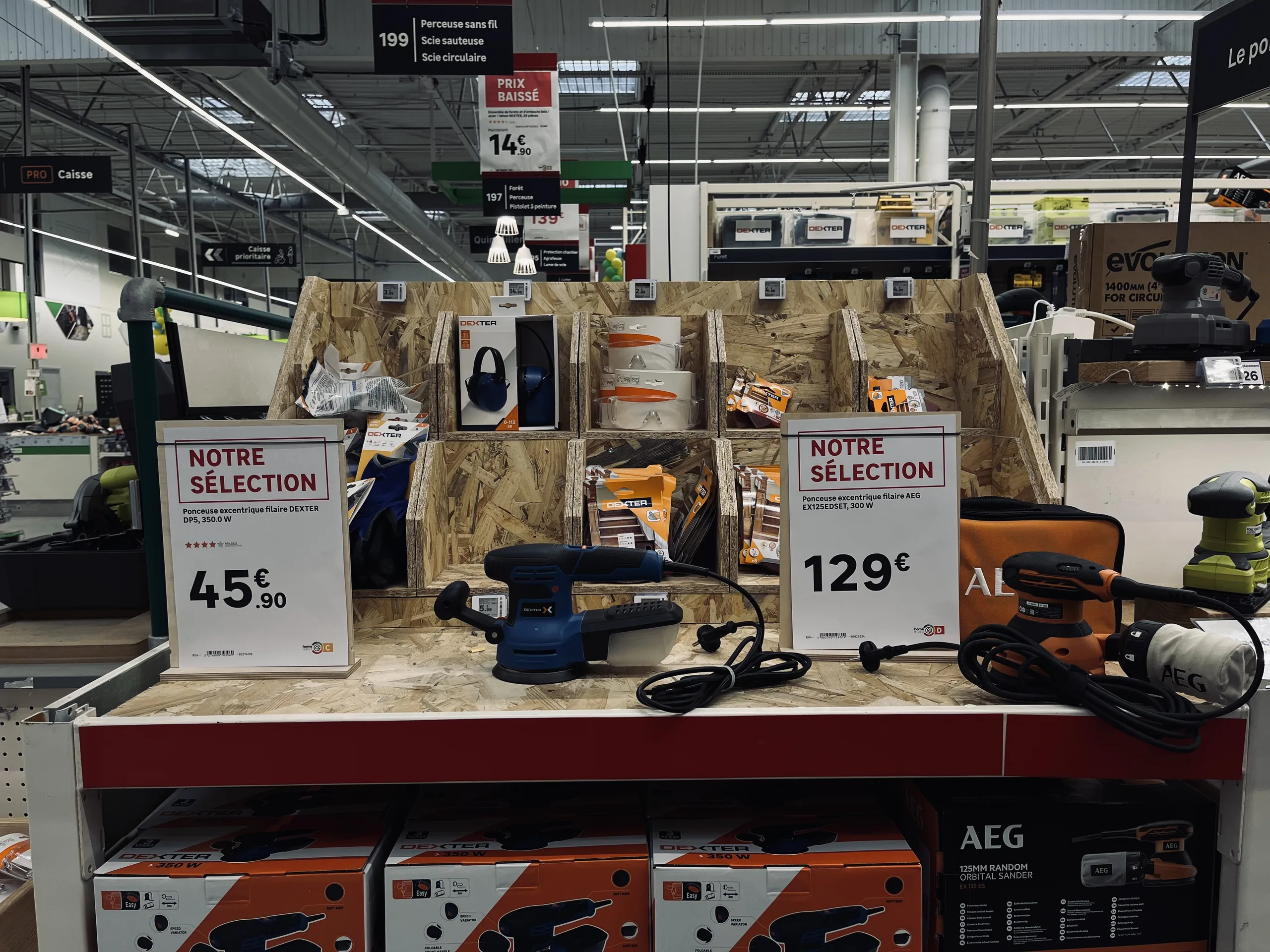
Tête de gondole d'outillage avec deux affiches « Notre sélection » indiquant le prix de ponceuses exposées
The store chooses the products it wants to highlight, and the display automatically incorporates the brand's template and data.

Large formats: print in-store or at the printer

End-cap display materials range from small labels to large banners. They are not all produced in the same way:

  • In-store, using a printer for small and medium formats, or on plotter for large posters.
  • At a print shop, for very large formats or specific media (banners, signage). The file must then comply with their specifications: dimensions, bleeds, crop marks, black overprint, vector graphics, and color profile.

A signage creation platform can automatically prepare these files with the required prepress settings, using the same data and templates as for smaller formats. There is no mandatory "end-cap" format: any media whose content can be populated by the brand's data and styled according to its graphic guidelines can be automated. To understand the principle, see our article on how toautomate price label creation.

How to create an effective end-cap: the checklist

  1. A single main message, readable from the aisle.
  2. A clear hierarchy : large signage for the promotion, smaller signage for each product.
  3. A visible and accurate price, with a compliant strikethrough price when the promotion warrants it.
  4. Consistent signage : same promotion, same brand guidelines, no expired posters.
  5. Products selected based on the actual layout of the store, and formats adapted to the available space.
  6. Quick updates as soon as a price or promotion changes.

In summary

The end-cap is one of the most visible locations in the store, and therefore one where signage has the most impact. To turn it into a real sales driver, you need a clear main message, a hierarchy between the different signs, and a price that is accurate, compliant, and consistent with the point of sale.
In a retail network, this requirement is managed at the level of each promotion: a common framework defined by headquarters, adaptation by each store, and signage populated by data rather than re-entered by hand.

‍

‍

Learn more

Managing your network's signage: //the 2026 best practices guide.//

Do you manage an integrated or franchise network? Discover our methodology for turning your signage into a driver of operational excellence. 25 pages of expertise, benchmarks, and practical checklists.

Download the white paper
Oops! Something went wrong while submitting the form.
Free resource
High-quality PDF format
Certified retail expertise
Frequently asked questions

Frequently asked questions about endcaps

What is an end-cap display?

This is an endcap display positioned facing the main aisle of the store. Highly visible, it is used to highlight promotions, new arrivals, or seasonal products.

What is the difference between an endcap and a back-of-aisle display?

An endcap is the end of a shelving unit facing the main aisle, while a back-of-aisle display is located at the far end of the aisle, facing the customer walking down it. Both are prime promotional spots, but the endcap captures the traffic from the main aisle.

What does "endcap" mean?

The term comes from retail and refers to a product displayed in the most visible spot on a shelf. In everyday language, it means "highlighted" or "front and center."

What materials should you use for an endcap display?

Typically: a header or banner for the campaign message, a promotional poster, product posters or price tags, shelf talkers, side panels, and sometimes hanging banners or tarpaulins.

How can you maintain consistent end-cap displays across an entire retail network?

By having the head office define the products, messaging, and display templates, and then letting each store choose its own items and formats based on its location, with displays powered by the brand's data and updated as soon as a price changes.

Additional resources

To learn more

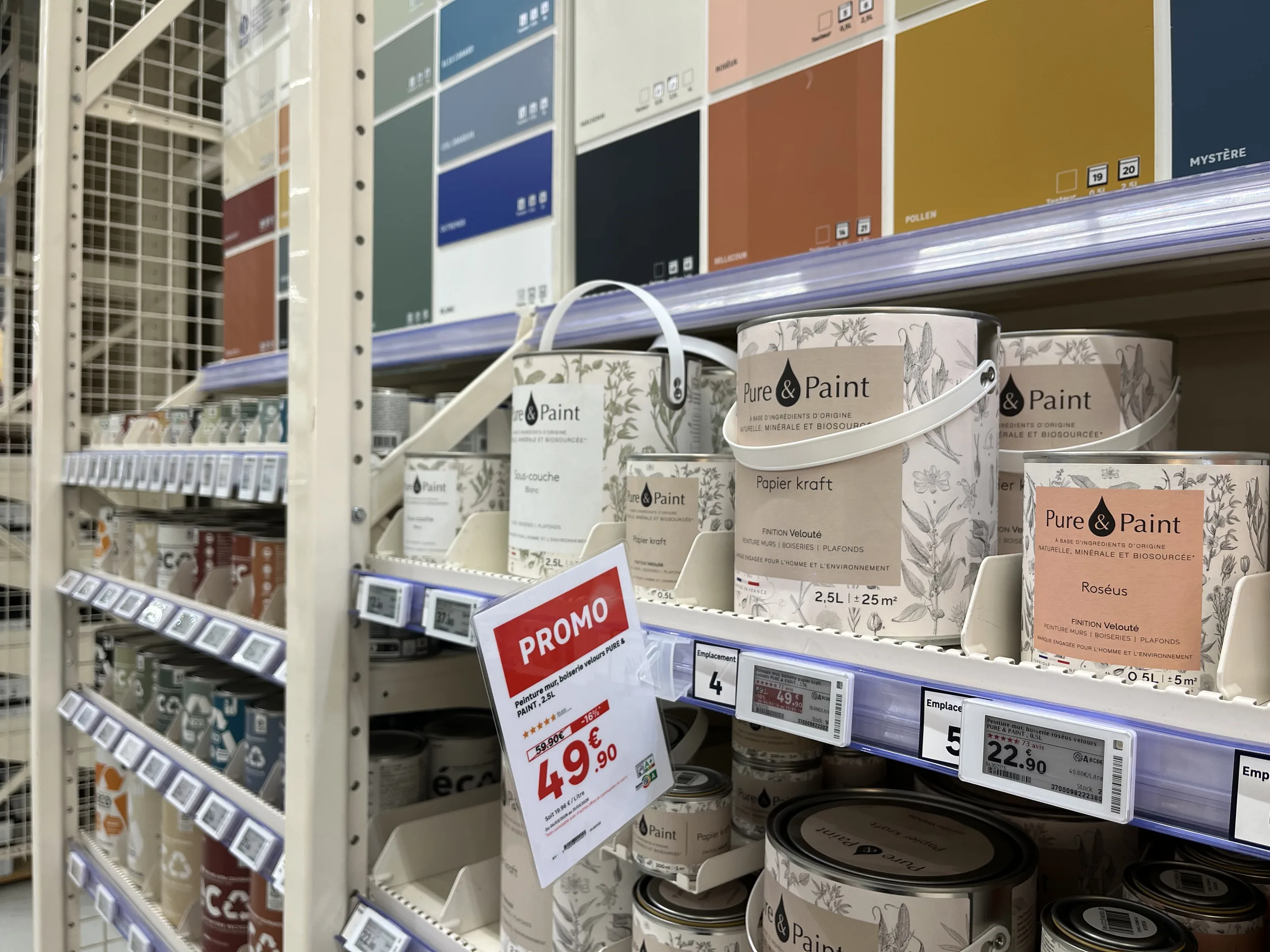
Rayon peinture avec une affiche promotionnelle papier suspendue au-dessus d'étiquettes électroniques de gondole
Omnichannel consistency
Franchise networks

Electronic vs. paper labels: how to choose for your stores

Electronic or paper labels? The debate is often framed as an all-or-nothing choice. Here is a comparison of the real advantages of each medium, and why the right choice is made format by format, without sacrificing automation or data reliability.

00

min read

Do you have to choose between electronic and paper labels?Not for the entire store at once. The right choice is made format by format: electronic labels are ideal for standard pricing on small shelf-edge formats, while paper remains better suited for large formats, promotions, product information sheets, and wet or outdoor areas. This choice of medium should not affect the quality of the display: with a platform connected to the retailer's data, paper benefits from the same automation, visual identity, and data reliability as electronic labels.

When a retailer considers electronic labels, the debate is often framed in all-or-nothing terms. On one side, electronics, synonymous with streamlined processes and reliable data. On the other, paper, associated with errors, delays, and makeshift signage.
This opposition is largely based on a misconception. The quality of a display is not determined by the medium, but by how it is produced. Here is how to compare the two and how to choose without giving up the benefits of either.

Electronic labels vs. paper labels: what are we talking about?

Electronic shelf labels, often called ESL (for electronic shelf label) internationally, are small screens attached to the shelf edge. Most often using e-ink, they display the price and some product information, receiving updates remotely from the retailer's systems.
Paper signage
includes all printed materials: shelf labels, promotional posters, technical sheets, strips, and end-cap or aisle-back signage. It is printed at headquarters, by a print shop, or directly in-store, and then placed by staff.

The false dilemma: the assumption that paper is synonymous with disorder

The negative image of paper stems from how it is often produced. In many stores, signs are created without tools connected to the data:

  • By a graphic designer at headquarters. The result is polished, but the sign arrives late and struggles to keep up with last-minute price changes.
  • By a store associate, using an office template. The sign is reactive, but the visual identity is not respected, prices or features are re-entered manually, and errors and typos multiply.
  • With a creation tool that is not connected to the retailer's data. The layout is improving, but manual re-entry—and the associated risk of error—remains.

Faced with this situation, electronic shelf labels are often presented as the only way to automate: data pulled from the source, brand guidelines followed, and time saved for teams. The implicit message is simple: to get out of the mess, you have to ditch paper.
That is where the misunderstanding lies. The benefits attributed to electronic labels do not come from the screen itself. They come from the connection to data and the automation of creation. A paper sign generated automatically from an ERP and PIM, using templates that comply with brand guidelines, offers the same reliability.

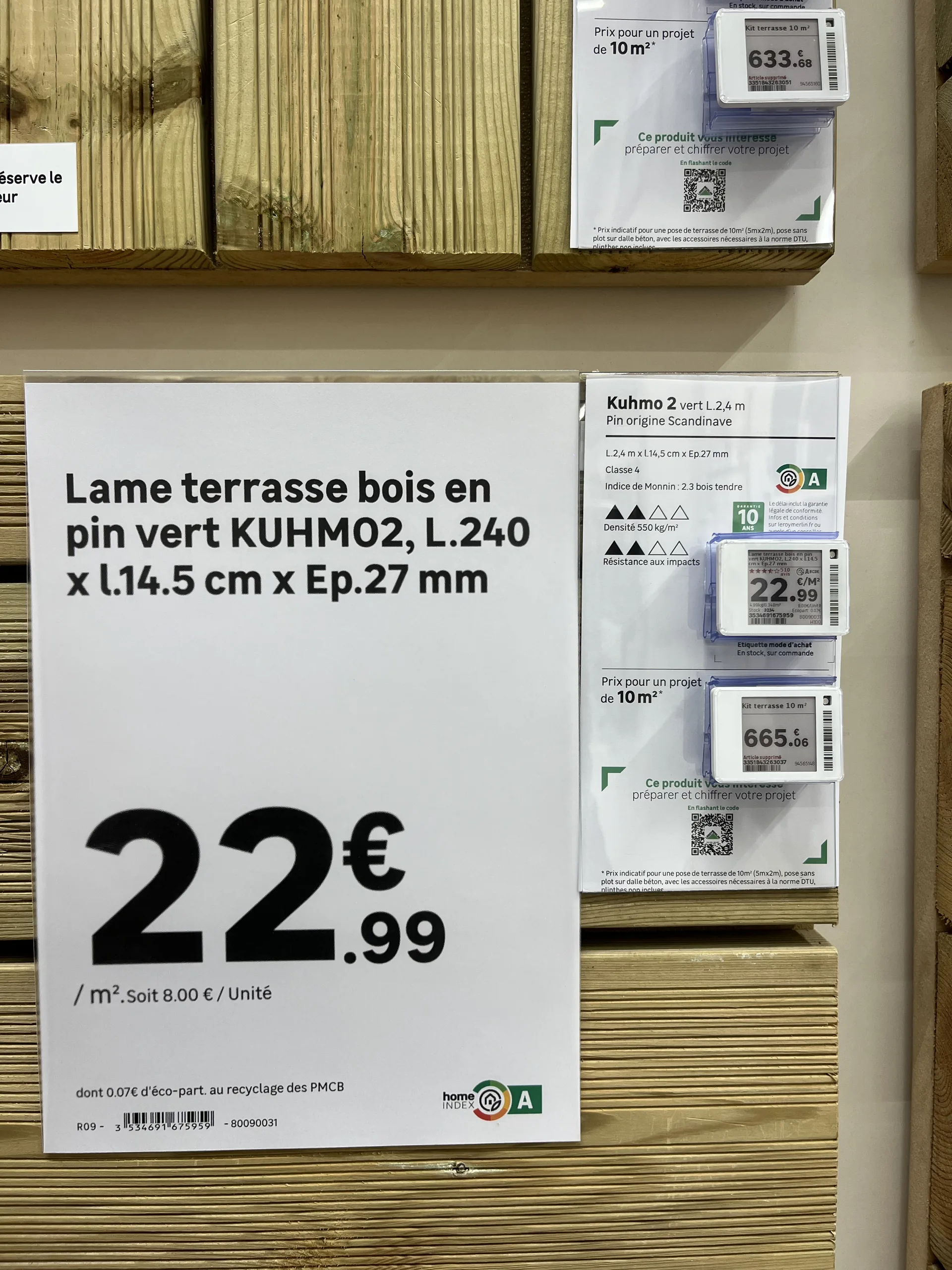
Affiche papier détaillant les dimensions et le prix au mètre carré d'une lame de terrasse, à côté de fiches produit avec étiquettes électroniques
Automatically generated paper sign and electronic labels side by side: same brand guidelines, same data.

A side-by-side comparison, criterion by criterion

Criterion
Electronic shelf label
Paper label and poster
Upfront cost
Electronic shelf labelHigh: labels, infrastructure and integration
PaperLow: printers and consumables
Price change
Electronic shelf labelRemote, within moments, with no action on the shelf (initial installation is still manual)
PaperEach item is printed then put up; both can be automated if the tool is connected to the data
Information displayed
Electronic shelf labelPrice and a few lines, small format
PaperUnlimited: photos, specifications, detailed mentions
Visibility
Electronic shelf labelRead up close, on the shelf edge
PaperAll formats, up to posters visible from a distance
Risk of mismatch with the till
Electronic shelf labelLow, the price comes straight from the system
PaperLow if the sign is generated from the data; real if it is re-keyed
Large formats (A5 to A2, shelf strips)
Electronic shelf labelVery expensive across a whole estate
PaperAffordable, any format
Damp or outdoor areas
Electronic shelf labelDifficult to install and maintain
PaperSuitable with a weather-resistant medium
Best use
Electronic shelf labelEveryday price on small formats with frequent price changes
PaperPromotions, large formats, product sheets, garden centres, outdoor areas
Qualitative comparison, for guidance only. Costs and uses vary with network size, the aisles concerned and the hardware chosen.

No single medium wins on every criterion. The choice depends on the location, format, and usage.

What electronic labels really bring to the table

The distinct advantage of electronic labels is clear: when a price changes, there are no more labels to print or place. Updates happen remotely in seconds across all relevant labels. On shelves where prices change frequently, this gain in time and responsiveness is real.
However, it must be measured precisely. The initial shelf placement remains manual: each label must be installed and associated with the correct product, just like a paper label. And the investment (labels, communication infrastructure, integration) is not always justified by this gain alone, especially in aisles where prices rarely change.

Where paper remains the best choice

Large formats. As soon as the medium exceeds the size of a small shelf-edge label (A5, A4, A3, A2, large strips), electronic equivalents become very expensive at scale. For promotional signs and aisle signage, paper remains by far the most accessible solution.
Humid or outdoor environments.
Garden centers, lumber yards, and areas exposed to the elements: electronic labels are difficult to install and maintain there. Paper, on a suitable holder, is much better suited for these conditions.
Detailed information.
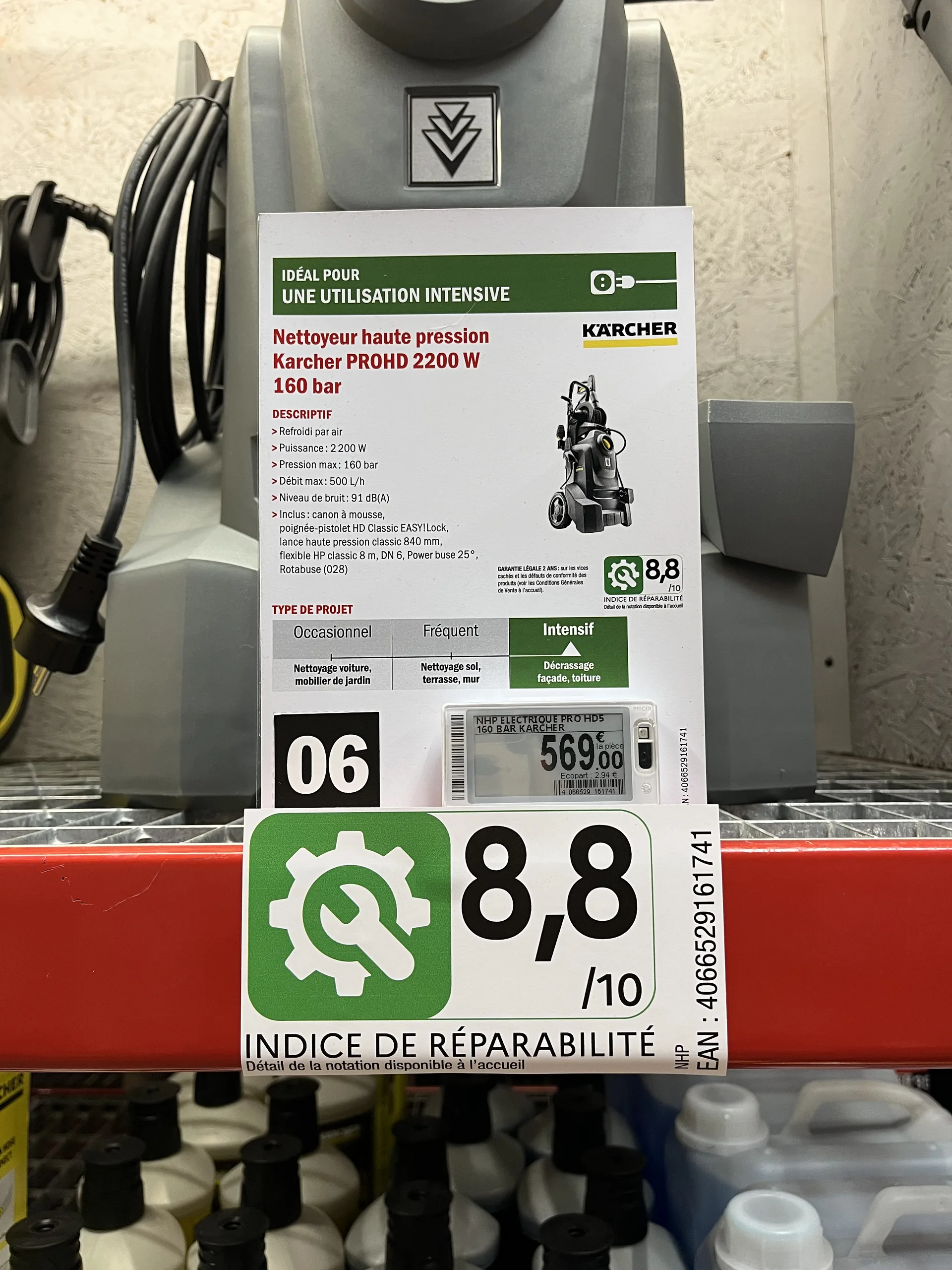
Technical specifications, icons, photos, and regulatory information like eco-participation fees or repairability scores: an electronic label screen cannot display everything. A paper sheet can.

Fiche produit papier d'un nettoyeur haute pression avec indice de réparabilité, au-dessus d'une étiquette électronique
Features, recommended usage, and repairability score on paper; price on the electronic label.

Visibility. A promotional sign is seen from a distance and triggers a purchase. A shelf-edge label is read up close.

Choose format by format, not store by store

Rather than a total overhaul, the right approach is to decide on a case-by-case basis, depending on:

  • Product placement : shelf edge, end cap, aisle, outdoor.
  • Store type : supermarket, convenience store, garden center, building supply store.
  • Format : small price tag, shelf strip, A4 or A3 poster, large format.
  • The choice of the store itself, especially in a franchise network: some stores prefer to invest in electronics, while others want to maximize the return on their existing printer fleet.

This is what most retailers supported by PiiVO do in the home improvement, furniture, and appliance sectors: electronic shelf labels for some shelves, paper for promotions, large formats, and technical products, often within the same aisle.

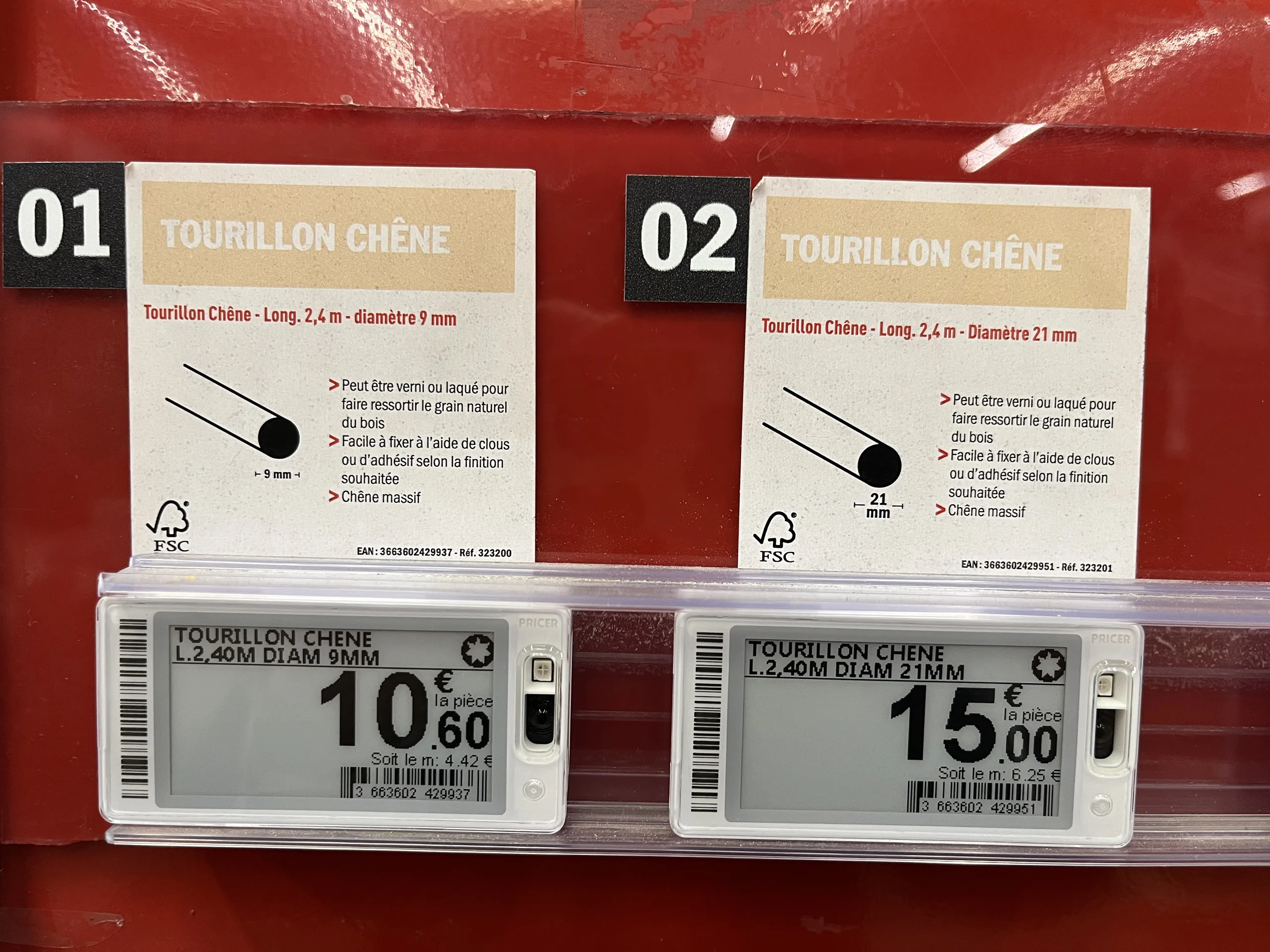
Fiches produit papier illustrées au-dessus d'étiquettes électroniques de gondole dans un rayon de tourillons en chêne
The paper sheet explains the product, while the electronic label displays the price.

Maintaining the same benefits, regardless of the medium

To ensure this remains a simple choice of medium rather than a change in method, both must be managed in the same way. This is the principle behind a hybrid signage creation platform like PiiVO POSter :

  • The same data : prices from the ERP, specifications from the PIM, and visuals from the DAM, for both paper and electronic formats.
  • The same brand identity : templates defined at headquarters and applied automatically, regardless of the format.
  • The same time savings : automatic or bulk creation, without re-entry, with direct in-store printing.

PiiVO is software: it sells neither electronic shelf labels nor printers, and works with the hardware chosen by the retailer. Several retailers fully equipped with paper have been able to automate their signage without committing to the investment of an electronic fleet, while keeping the option to switch to electronic where it makes sense.
Conversely, PiiVO can also feed electronic shelf labels directly. A home improvement retailer has been using this hybrid connection since 2026, with a gradual rollout underway in its stores: a single platform manages both paper signage and electronic labels. To learn more, see our article on how toautomate price label creation.

How to choose for your stores: 5 questions to ask yourself

  1. How often do your prices change, aisle by aisle? Electronic labels are primarily justified where prices change frequently.
  2. What formats do you use? The larger the signage, the more paper retains the cost advantage.
  3. Do your stores have humid or outdoor areas? Garden centers and lumber yards are still better served by paper.
  4. Do all your stores have the same needs? In a franchise network, each store can make a different choice.
  5. Is your paper signage already connected to your data? If not, that is the first priority: it provides a large portion of the expected benefits of electronic labels without changing the medium.

In summary

Electronic and paper labels are not mutually exclusive. Electronic labels provide remote price updates; paper retains the advantage for large formats, promotions, detailed information, and harsh environments. The choice is made format by format, depending on the location, store type, and the preference of each point of sale.
The most important thing lies elsewhere: it is the connection to data and automation that determine the quality of signage, not the medium. With a platform that manages both, the choice between paper and electronic becomes a tactical decision, not a process revolution.

‍

‍

Omnichannel consistency
Large corporations

Why is automation the pillar of brand consistency?

Network consistency relies on centralizing assets at headquarters and automating their production using brand data. This approach eliminates discrepancies between headquarters and points of sale, freeing store teams from repetitive tasks. In a competitive market, this visual uniformity becomes a genuine brand asset.

00

min read

Every brand manager knows the feeling.

‍
Walking into one of your stores and sensing, from a single display detail, that something doesn't quite align with the national image. A hand-drawn sign, a poorly framed promotion, a stray price tag. It may seem minor, but that is often where the loss of consistency begins.

The stakes of brand image across a network

‍

An integrated network is built on a simple promise: the customer should have the same experience whether they walk into a store in Lille or Marseille. The operational reality is often different. Without a standardized tool, each point of sale ends up creating its own materials and signage to handle urgent shelf needs.

Take a department manager on a busy Friday evening without the right printed materials on hand. They open a word processor, cobble together a sign, print it, and put it up. They did their job; they handled the emergency. But multiply that action by hundreds of stores and dozens of occasions per year, and you end up with a visual patchwork that bears no resemblance to the polished identity intended by headquarters.

This is what we call local DIY: approximate fonts, distorted logos, and amateur layouts. In isolation, these deviations seem harmless. Accumulated across a large network, they dilute the national identity and weaken the perception of the brand's quality.

Manual vs. automated display management: what changes

‍

The contrast between manual and automated management is evident in five concrete aspects of daily network operations.

Visual consistency. With manual management, it varies from one store to another based on local habits. With automated management, it is identical across the entire network.

Brand guidelines. Left in the hands of each point of sale, they eventually get altered. Locked into centralized templates, they remain intact everywhere.

Price updates. When manual, they rely on re-entry, which is a source of errors and shelf discrepancies. When automated, they are synchronized directly from the brand's data.

Campaign deployment. It takes several days when each store produces its own materials. It drops to just a few hours when everything comes from a centralized production source.

Store team time. Absorbed by creating materials in the first scenario, it is refocused on sales and customer advice in the second.

This contrast sums up the challenge: automating signage is not just a cosmetic convenience, it is an industrial safeguard for your brand image.

Ending local DIY with automated templates

‍

To eliminate this inconsistency, the solution is not constant manual control, which is impossible to maintain across a large network, but rather providing intelligent templates. By centralizing templates at headquarters, the brand guarantees three things.

  • The brand identity is locked : fonts, colors, and logos are fixed within the templates and can no longer be altered locally.

‍

  • Content remains dynamic : each material is automatically populated with the correct prices, descriptions, and visuals, with no re-entry required.

‍

  • Autonomy is managed : the store retains the ability to produce its materials on demand, but always within the framework validated by headquarters.

This is the balance every network seeks: a nationally controlled image with flexible local execution.

Data synchronization: the right price everywhere, all the time

Connecting the brand's data streams—whether from the PIM, DAM, or ERP—to shelf labeling is the engine of this transformation. The major risk in retail remains the discrepancy between the displayed price and the price paid at checkout, a source of customer dissatisfaction and regulatory exposure. With automated production, data becomes live and reliable.

  • Zero manual entry : pricing data from the ERP flows directly to labels and signage, with no manual intervention required.

‍

  • Reliable display : price updates are automatically reflected across all relevant media, minimizing the risk of discrepancies on the shelf.

‍

  • Immediate responsiveness : price changes or promotional campaigns can be rolled out across the entire network in just a few hours.

Automation: a driver of overall performance

Beyond the visual aspect, automating signage is a key driver of profitability. By freeing department managers from time-consuming administrative tasks, the brand restores their primary mission: sales and customer service.

Automating signage isn't about taking away a team's role; it's about giving it back to them. A department manager didn't choose this career to recreate labels at a desk, but to bring their store to life and advise their customers. Giving this time back to the teams is arguably the most concrete—and human—benefit of this transformation.

In a sector where operational excellence makes all the difference, shifting from a culture of data entry to a culture of management is one of the best investments a network can make to sustain its growth and value its human capital.