
Your PDFs arrive at the right printer, //automatically//
PiiVO Printer is the software agent that orchestrates sending your documents to the correct printing hardware, without your teams needing to select a printer, tray, or format. Everything happens in the background, according to the rules you have defined, at any volume.

There is still too much manual intervention between the PDF and the printer
Manually managing print settings is a constant source of errors, wasted paper, and lost time, especially across a large retail network.

Too many choices, too many errors
Staff members have to manually select the printer, tray, and format. One mistake (wrong printer, wrong tray, wrong format) means the job must be restarted, resulting in wasted paper and a missing shelf label.
Consequences:
- Frequent printing errors
- Paper wasted on incorrect formats
- Pressure on field teams during peak activity

Volumes impossible to manage manually
During a national price update or promotional campaign, thousands of documents must be sent to the right place at the right time. Without automation, each store manages this on its own, leading to inevitable errors.
Consequences:
- Bottlenecks during price changes
- Incomplete or delayed shelf labeling
- Heavy administrative burden on teams

Existing software cannot handle the load
Many print spoolers on the market are designed for low volumes. On a large network with hundreds of stores and thousands of labels to print simultaneously, they quickly become saturated and cause outages at the worst possible time.
Consequences:
- System crashes during peak periods (sales, promotions)
- IT support overwhelmed by recurring issues
- Lack of a scalable solution for large networks
An intelligent print agent, not just a simple spooler
Printer applies your business rules to every document (format, store, department, media type) before sending it to the correct printer with the right settings.
Automatic dispatch to the correct printer
Each PDF is intelligently routed according to the rules you have configured: store, department, document type, paper size. Neither the salesperson nor the department manager needs to remember which printer is connected where.

The print job arrives at the right place, without manual handling, the very first time.

Tray and format management
Shelf strips on pre-cut paper in tray 2, small labels on the roll printer, large formats to the plotter: Printer knows your hardware fleet and adapts every job accordingly.
Your teams no longer need to worry about hardware. They can focus on the sales floor.

Automatic imposition
Multiple small formats are automatically grouped on a single A4 sheet to optimize paper usage. Imposition is handled entirely by Printer, with no user intervention required.
Zero waste, zero manual configuration.
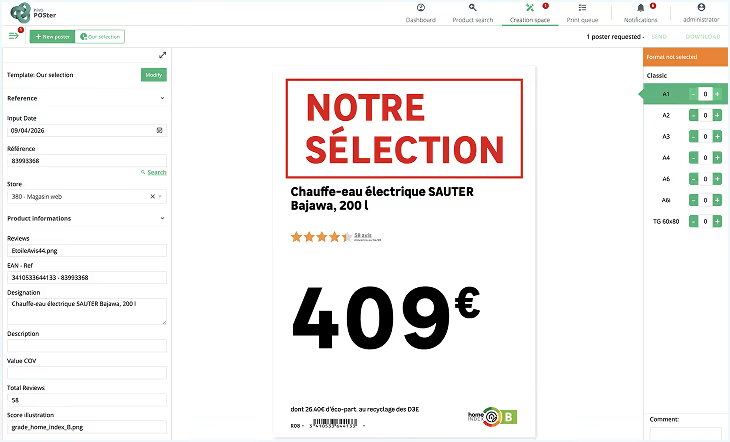
Native connection to POSter
When used with POSter, Printer closes the loop in a single click: the salesperson creates their sign in POSter, confirms the send, and Printer handles the rest (printer selection, settings, imposition). The salesperson never has to open a print dialog box.
One simple action, from creation to printed label.
Compatible with any PDF source
Printer does not depend on POSter. It can retrieve PDFs from any system that generates them: an ERP module, business software, quoting tools, or internal applications. If it produces a PDF, Printer can handle its dispatch.
No need to change your design software. Printer adapts to your existing setup.
High-load performance for large networks
Printer is designed for retailers with hundreds of points of sale and thousands of documents to process at once. Where other solutions struggle as volumes increase, Printer handles spikes without fail.
Your national price changeover goes off without a hitch, even across 300 stores simultaneously.


Deployment tailored to your organization and constraints
Printer installs wherever you need it (in-store, on a centralized server, or in the PiiVO cloud) without requiring an overhaul of your IT environment.

Printer is installed directly on a PC at the point of sale. It manages the store's printer fleet completely autonomously.

A single server manages dispatch for the entire network. Ideal for retailers who want to control their printing fleet from headquarters and standardize sending rules.

Printer is hosted and maintained by PiiVO. There is no infrastructure for you to manage, updates are seamless, and scalability is guaranteed.
Regardless of the chosen mode, PiiVO supports your teams at every stage of installation and integration. The goal: getting Printer up and running as quickly as possible, with minimal impact on your IT department.
How is PiiVO Printer used in stores on a daily basis?
Use cases based on real-world retail network experiences.
.avif)


PiiVO Printer in their daily operations
Department managers and business leaders explain how Printer secures their store labeling.
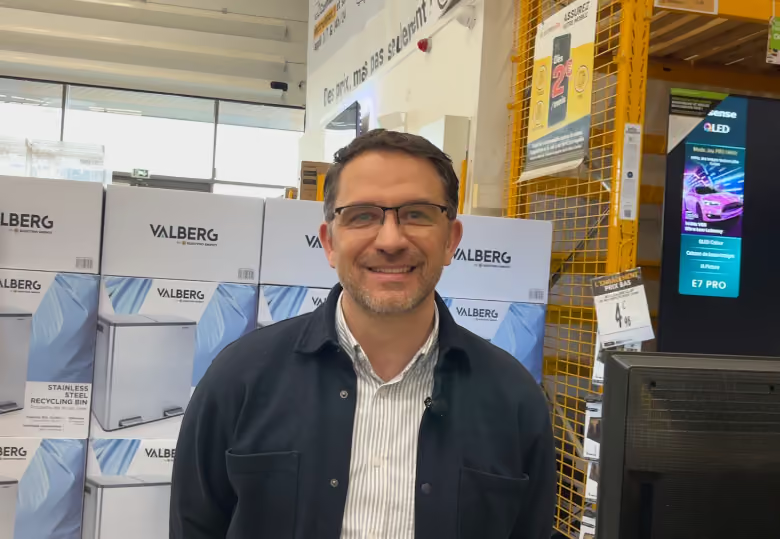

PiiVO understood our needs and found the solutions to address them.
Design & Packaging Manager at Électro Dépôt

See exactly how PiiVO Printer automates your in-store printing
In just a few minutes, show us your current setup. We’ll explain how Printer connects to it and what it can handle, without heavy projects or changing your existing tools.
Answers to technical questions about PiiVO POSter
Integration, security, deployment: we provide clear answers to the key points before you get started.
Yes. Printer is sold natively with POSter, but it functions completely independently. If you already have software that generates PDFs—an ERP module, a quoting tool, or an internal application—Printer can connect to it and handle all the dispatching to your printers. The only requirement is that your software produces PDFs. Printer takes care of the rest.
Let's discuss your needsPrinter offers three installation modes, depending on your IT constraints and organization:
- Local PC in-store: Printer is installed directly on a point-of-sale workstation. It manages the store's printer fleet autonomously.
- Centralized server: A single server manages dispatch for the entire network. Suitable for retailers who want to control their printing rules from headquarters.
- SaaS mode: Printer is hosted in the PiiVO cloud. No infrastructure for you to maintain, with seamless updates.
The chosen mode is defined with you during onboarding, based on your architecture and IT constraints.
Let's discuss your data flowsEverything is based on rules you configure during onboarding: document format, media type, originating store, department, and more. Once these rules are set, Printer applies them automatically to every incoming document. If a PDF matches a strip format, it is sent to the laser printer using the correct tray. If it is a small label format, it is routed to the roll printer. If it is a large format, it goes to the plotter. No user intervention is required.
Let's discuss your infrastructureYes. Imposition—the process of grouping multiple small formats onto a single A4 sheet to avoid paper waste—is natively integrated into Printer. For example, several strip labels can be automatically assembled onto an A4 sheet before being sent to the printer. You define the imposition rules during setup, and Printer then applies them without any further intervention.
Let's talk about securityThis is precisely where Printer stands out. Many spooling software solutions work well with small volumes but quickly become overwhelmed as soon as the load increases, particularly during national price changes when thousands of PDFs must be processed simultaneously. Printer is designed to meet the demands of large retail networks with hundreds of points of sale and significant spikes in activity. We have clients who process several thousand documents overnight without a single issue.
Automate product and price displays in-store


