Home
Our ressources
Évènements
&
Évènements
Tech for Retail 2026 : retrouvez PiiVO sur le stand K53

Tech for Retail 2026 : retrouvez PiiVO sur le stand K53

Published on
00
min read
Évènements
Évènements
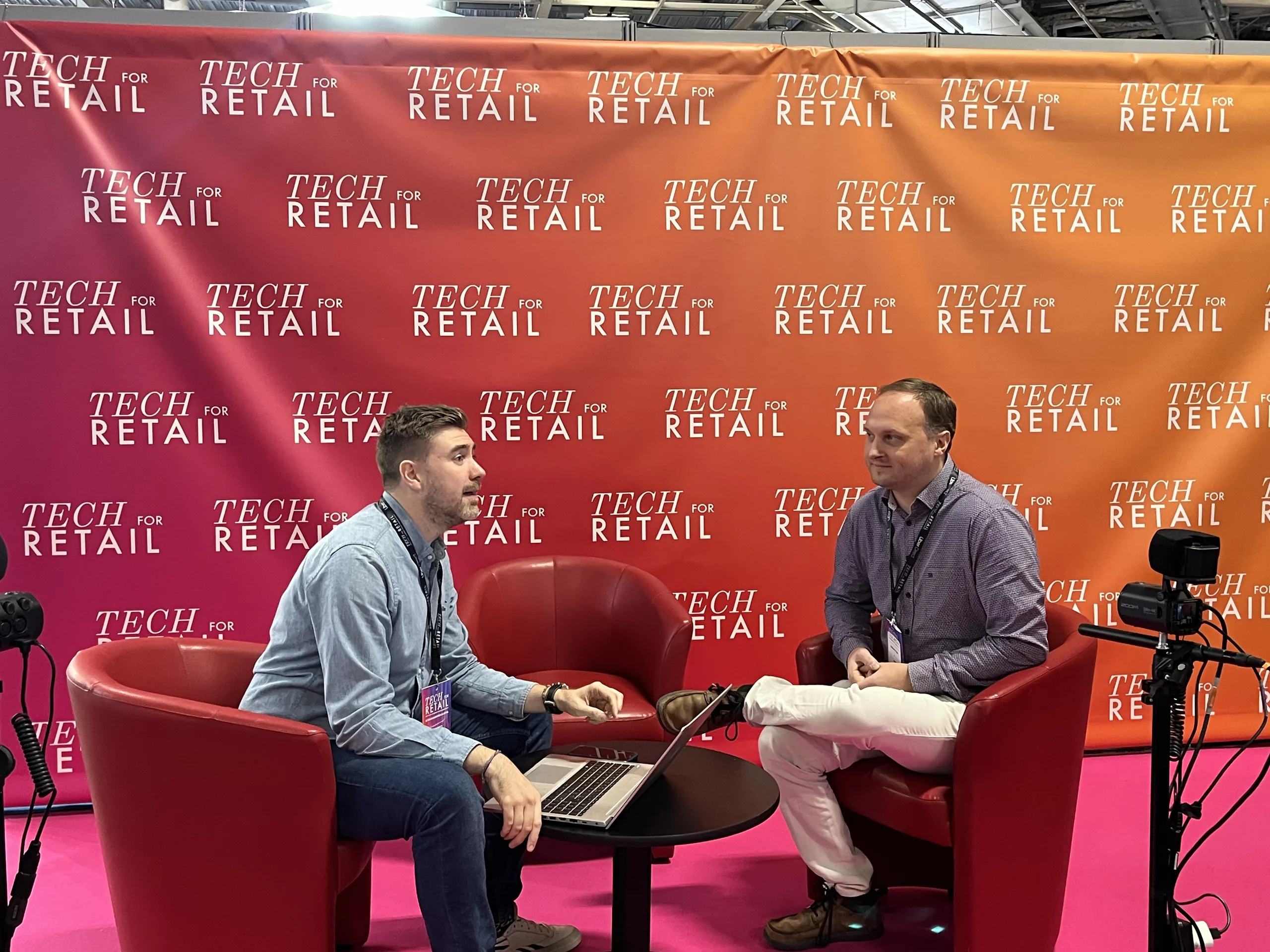
Enregistrement d’un podcast devant le mur aux couleurs de Tech for Retail, deux intervenants assis dans des fauteuils rouges
Table of contents

How can you ensure visual consistency across a retail chain?

PiiVO sera présent à Tech for Retail 2026, les 30 novembre et 1er décembre à Paris Expo Porte de Versailles, sur le stand K53. Au programme : des mises en situation pour voir PiiVO à l'œuvre en magasin, la complémentarité entre signalétique papier et étiquettes électroniques, et un nouvel épisode de podcast avec AB Merchandising.

Chaque fin d'année, Tech for Retail réunit à Paris les enseignes et les acteurs de la technologie pour le commerce. Pour cette sixième édition, nous serons de nouveau du rendez-vous, avec une idée simple : vous montrer, en situation réelle, comment une affiche juste et conforme peut sortir en quelques secondes dans n'importe quel magasin de votre réseau.

Tech for Retail 2026 : l'essentiel

  • Dates : lundi 30 novembre et mardi 1er décembre 2026
  • Lieu : Paris Expo Porte de Versailles, hall 7.2
  • Stand PiiVO : K53
  • Le salon : plus de 420 exposants, 15 000 décideurs du retail attendus, plus de 200 conférences et des visites guidées thématiques pour repérer les solutions utiles à son enseigne

Pourquoi nous revenons à Tech for Retail

Ce n'est pas notre première participation. L'an dernier, nous avions remporté un concours de pitch organisé pendant le salon, dans la catégorie « expérience magasin ». Une belle reconnaissance pour un sujet, l'affichage en magasin, souvent sous-estimé alors qu'il touche chaque produit et chaque client.
Tech for Retail s'est imposé comme un rendez-vous européen pour les décideurs du commerce. On y croise les équipes marketing, merchandising, opérations et systèmes d'information des enseignes : exactement les équipes qui vivent au quotidien les enjeux de l'affichage en magasin.
Le calendrier tombe aussi à point. Le salon ouvre trois jours après le Black Friday, le moment de l'année où l'affichage est le plus sollicité : sur une seule journée de Black Friday, l'ensemble de nos clients peut générer plus de 220 000 affiches. C'est le bon moment pour faire le bilan des opérations commerciales et préparer les suivantes, des soldes d'hiver aux prochaines évolutions réglementaires. Nous avons d'ailleurs consacré un article à la manière de tenir le pic d'affichage des soldes et du Black Friday.

Ce que vous découvrirez sur le stand K53

Cette année, nous avons voulu un stand plus concret : moins de présentations, plus de mises en situation. L'objectif est de vous montrer comment PiiVO s'utilise vraiment en magasin, du changement de prix jusqu'à l'affiche posée en rayon.
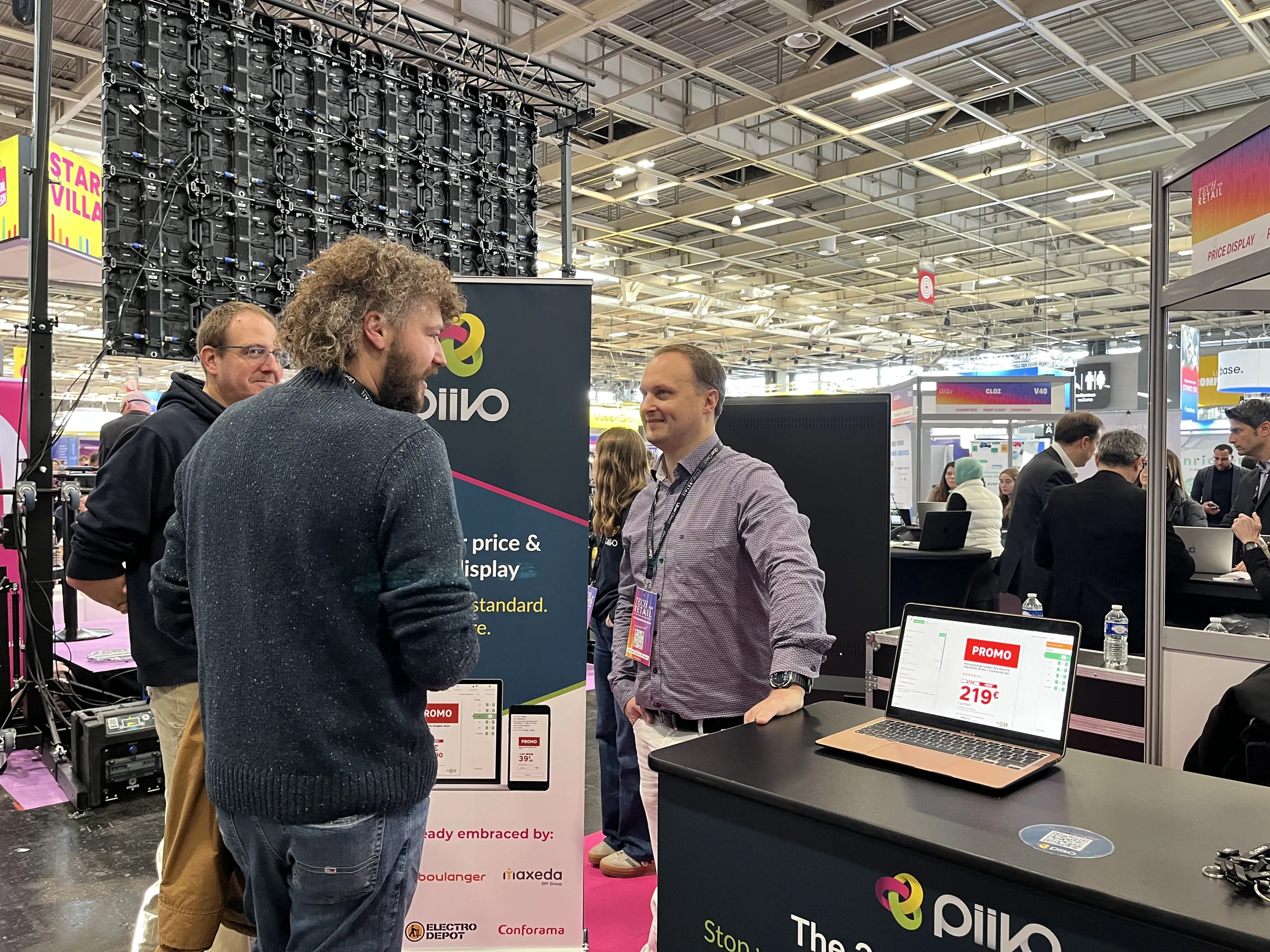
Échange sur le stand PiiVO à Tech for Retail 2025, à côté d’un ordinateur affichant une affiche promotionnelle à 219 €
Une démonstration sur le stand PiiVO à Tech for Retail 2025. Cette année, place aux mises en situation sur le stand K53.

Papier et étiquettes électroniques : deux supports complémentaires

Le fil rouge de ces démonstrations : la complémentarité entre la signalétique papier et les étiquettes électroniques. Les étiquettes électroniques facilitent les changements de prix fréquents ; l'affiche papier reste incontournable pour les promotions, les grands formats, les têtes de gondole et tous les messages qui doivent se voir de loin. Plutôt que d'opposer les deux, PiiVO les pilote depuis le même outil et à partir des mêmes données : vous choisissez le support format par format, selon l'emplacement et le magasin. Nous avons détaillé ces critères dans étiquettes électroniques ou papier : comment choisir.

Tout le parcours de l'affichage, de la donnée au rayon

Sur le stand, vous verrez aussi comment PiiVO POSter et PiiVO Printer prennent en charge l'ensemble du parcours :

  • La création automatique des affiches : affiches prix, étiquettes, stop-rayons ou supports de tête de gondole sont générés à partir de vos données (PIM, ERP, système de caisse), dans la charte graphique de votre enseigne. Le détail du parcours est expliqué dans notre article sur l'automatisation de la création d'étiquettes.
  • Des affiches toujours à jour : quand un prix change, la nouvelle affiche peut être recréée automatiquement, sans ressaisie.
  • Un affichage cohérent dans tout le réseau : le siège fixe le cadre, chaque magasin garde la main sur ce qui fait sa réalité locale, qu'il soit intégré ou franchisé.
  • L'impression au bon endroit : avec PiiVO Printer, les fichiers arrivent automatiquement sur la bonne imprimante du bon magasin.

Un nouvel épisode de podcast enregistré pendant le salon

Autre rendez-vous de cette édition : nous enregistrerons un nouvel épisode du podcast « Pour toutes ces bonnes raisons » avec AB Merchandising, avec cette fois une invitée supplémentaire : une cliente de PiiVO. L'occasion d'entendre, en plus du nôtre, le regard de quelqu'un qui utilise PiiVO au quotidien.
L'an dernier déjà, Guillaume Kozak, cofondateur et CEO de PiiVO, était l'invité d'Adrien Bernard, fondateur d'AB Merchandising, pour un épisode enregistré en direct du salon. Au programme : le balisage, un sujet très terrain, souvent sous-estimé, mais stratégique pour les enseignes. L'épisode est à réécouter ici : Automatiser la communication in-store : comment PiiVO transforme le retail et la grande distribution.

Les sujets dont nous aimerions parler avec vous

Venez avec vos questions du terrain. Ce sont souvent les mêmes d'une enseigne à l'autre :

  • Comment garantir un affichage des prix conforme dans tous les magasins, du prix barré aux mentions obligatoires ? Voir nos repères sur les erreurs d'affichage les plus fréquentes.
  • Comment éviter qu'un client trouve un prix différent en rayon et sur le site ? C'est le sujet de notre article sur la cohérence entre magasin et e-commerce.
  • Comment déployer une opération commerciale dans tout un réseau sans multiplier les erreurs, jusqu'à la tête de gondole ?
  • Comment répartir papier et étiquettes électroniques selon les rayons et les magasins ?
  • Combien de temps vos équipes passent-elles aujourd'hui à créer et à refaire leurs affiches ?

Prendre rendez-vous sur le stand

Pour être sûr de nous voir, le plus simple est de réserver un créneau à l'avance en nous écrivant via notre page contact. Vous pouvez aussi passer directement sur le stand K53 pendant les deux jours du salon.

En résumé

Les 30 novembre et 1er décembre, rendez-vous à Paris Expo Porte de Versailles, hall 7.2, sur le stand K53. Que vous cherchiez à gagner du temps en magasin, à fiabiliser vos prix ou à bien répartir papier et étiquettes électroniques dans votre réseau, nous serons ravis d'en parler avec vous, démonstration à l'appui.

Learn more

Managing your network's signage: //the 2026 best practices guide.//

Do you manage an integrated or franchise network? Discover our methodology for turning your signage into a driver of operational excellence. 25 pages of expertise, benchmarks, and practical checklists.

Download the white paper
Oops! Something went wrong while submitting the form.
Free resource
High-quality PDF format
Certified retail expertise
Frequently asked questions

Les questions fréquentes sur PiiVO à Tech for Retail 2026

Quand et où a lieu Tech for Retail 2026 ?

Tech for Retail 2026 a lieu le lundi 30 novembre et le mardi 1er décembre 2026, à Paris Expo Porte de Versailles, hall 7.2.

Sur quel stand trouver PiiVO ?

PiiVO est présent sur le stand K53 pendant les deux jours du salon.

Que présente PiiVO sur son stand ?

Des mises en situation pour voir concrètement comment PiiVO s'utilise en magasin : la création automatique des affiches prix et du balisage à partir des données de l'enseigne avec PiiVO POSter, l'impression automatique sur la bonne imprimante de chaque magasin avec PiiVO Printer, et la complémentarité entre la signalétique papier et les étiquettes électroniques.

PiiVO a-t-il déjà participé à Tech for Retail ?

Oui. En 2025, PiiVO a remporté un concours de pitch organisé pendant le salon, dans la catégorie « expérience magasin », et Guillaume Kozak, cofondateur et CEO, a enregistré un épisode du podcast « Pour toutes ces bonnes raisons » d'AB Merchandising. En 2026, un nouvel épisode est enregistré avec une cliente de PiiVO.

Comment prendre rendez-vous avec l'équipe PiiVO pendant le salon ?

En nous écrivant via la page contact du site pour réserver un créneau, ou en passant directement sur le stand K53.

Additional resources

To learn more

Sales Operations
Large corporations

Sales and Black Friday: how to handle the signage peak

During sales and Black Friday, the volume of signage to produce skyrockets. Discover, through data and testimonials, how display automation helps you handle the peak stress-free and saves teams up to half the time spent on labeling.

00

min read

How to manage in-store price displays during sales and Black Friday? During sales and Black Friday, the volume of price tags and signs to produce explodes over just a few days. Managing this display peak requires generating and deploying thousands of up-to-date materials, without pricing errors, across the entire store network. Price display automation, connected to product data, allows you to move from exhausting manual labeling to controlled updates in just a few clicks.

For a retail chain, major commercial events are a moment of truth. This is when traffic is at its highest, competition is fiercest, and the slightest pricing error on the shelf comes at a high cost. It is also when the workload for labeling and price displays reaches its peak: tags, signs, shelf talkers, and signage materials must be changed everywhere, almost simultaneously. Here is why this display peak is so difficult to handle, and how automation turns it into a simple formality.

Sales and price displays: a challenge of volume and speed

An event like Black Friday isn't just about changing a few prices. Across a network, it involves tens or even hundreds of thousands of materials to produce and set up within a very short window.

The observed volumes illustrate the scale of the challenge:

  • On a single Black Friday, more than 220,000 signs can be generated across a retail chain.
  • A major DIY retailer produced 160,000 signs for a single Black Friday.
  • A retailer can generate 3,000 signs per day on average, which is nearly 100,000 per month.
  • Another retailer produces 10,000 signs per day during standard periods, and 300,000 per quarter.

These figures illustrate a simple reality: during peak periods, manual sign production is no longer sustainable. The bottleneck isn't the store; it's the ability to quickly generate accurate materials.

Affiche prix promotionnelle en grand format sur une opération commerciale en magasin
During a sales event, a single retailer can generate several thousand price signs like this one, deployed across its entire network in just a few hours.

Changing prices by hand: the cost to your teams

Behind these volumes are store teams. For them, managing sales periods manually is often an operational nightmare.

A store manager's testimonial sums it up well. Before automation, launching sales meant several hours of manual labor right at opening: changing prices one by one, updating product names, verifying item codes, and working through an endless to-do list. It was a dreaded time, to the point where staff would prefer not to work those days.

With an automated solution, the experience changes radically. Only the products actually on sale—those with updated prices—are generated. Everything else is automatic. The same manager describes the time savings as incredible, to the point where they actually enjoy working during sales now.

This gain is not insignificant: for sign-related tasks, it can reach about 50% of the time spent.

Promotional price signage on a shelf during an in-store campaign

Promotional signage rolled out on the shelf during a retail campaign.

Price labels and signs on products in a store

Thousands of price labels and signs generated for a single campaign.

Store shelf with price signage and promotional display material

Consistent price and promotional signage across the entire shelf.

Large format price signs on a gondola end display in a store

Large format signs on the store's highest impact locations.

Automated price signage on the products of a store shelf

Signage that is up to date and consistent, ready before the doors open.

Why automation handles the peak

Automating signage changes the game because it addresses the root cause of the problem: manual production, one sign at a time. Three mechanisms are at play.

  • Mass generation. Using centralized templates and product data, thousands of signs are generated in a single operation, rather than being created one by one.
  • Updates at the source. The sale price comes directly from the retailer's systems, ensuring that the sign matches the price actually charged at the register.
  • Deployment across the entire network. An operation is launched across all relevant stores at once, without depending on the availability of individual teams.

Manual or automated: handling the peak of sales signage

Criterion
Manual management
Automated management
Volume handled
Manual managementLimited by the time teams have
Automated managementThousands of signs in a single run
Preparation time
Manual managementSeveral hours from opening
Automated managementCut by roughly half on signage tasks
Price accuracy
Manual managementRisk of a gap between shelf and till
Automated managementPrices taken straight from the systems
Network rollout
Manual managementStore by store
Automated managementIn one go across the whole network
Team experience
Manual managementA dreaded period of repetitive tasks
Automated managementRefocused on selling and advising
Volumes and time savings reported by PiiVO retail customers, for guidance only. Results vary with network size and the type of campaign.

Planning ahead: preparing for a commercial operation

Managing the peak isn't just about the big day; it's about the preparation. A well-executed operation requires preparing templates in advance, ensuring product data is up to date in your systems, and scheduling the deployment so everything is ready by opening time.

This is precisely where automation brings peace of mind: once templates are approved at headquarters and connected to your data, launching a large-scale operation becomes a simple, repeatable task, even across hundreds of stores simultaneously.

Conclusion: turning a peak into a controlled routine

Sales and Black Friday will always be intense periods. But the burden of signage doesn't have to be a struggle. By moving from manual production to automated, data-driven generation, a retailer can transform a dreaded peak into a controlled, fast, and reliable operation across their entire network.

The real benefit is twofold: accurate prices displayed everywhere at the right time, and teams freed up to focus on what really matters during high-traffic periods—sales and the customer.

‍

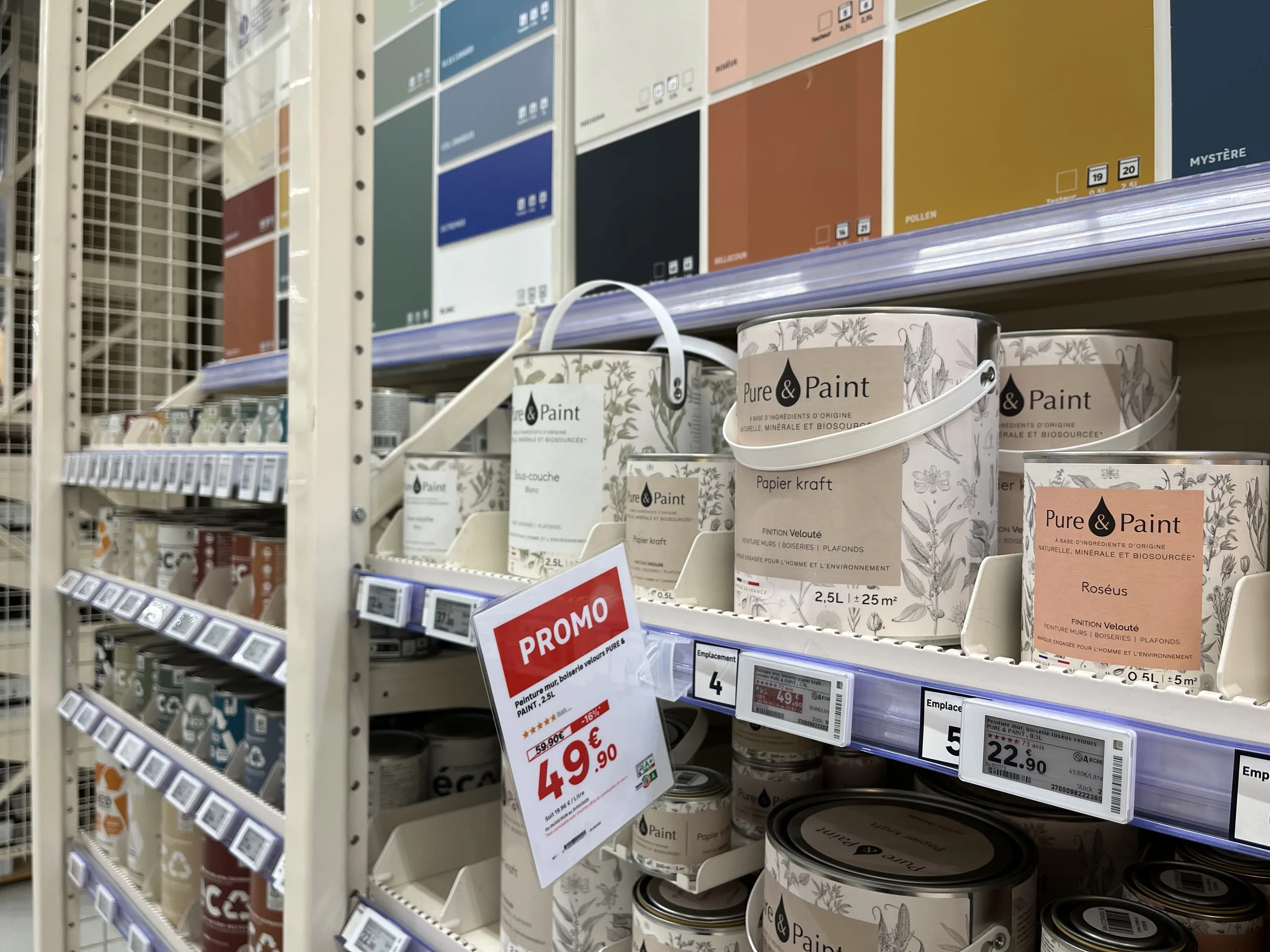
Rayon peinture avec une affiche promotionnelle papier suspendue au-dessus d'étiquettes électroniques de gondole
Omnichannel consistency
Franchise networks

Electronic vs. paper labels: how to choose for your stores

Electronic or paper labels? The debate is often framed as an all-or-nothing choice. Here is a comparison of the real advantages of each medium, and why the right choice is made format by format, without sacrificing automation or data reliability.

00

min read

Do you have to choose between electronic and paper labels? Not for the entire store at once. The right choice is made format by format: electronic labels are ideal for standard pricing on small shelf-edge formats, while paper remains better suited for large formats, promotions, product information sheets, and wet or outdoor areas. This choice of medium should not affect the quality of the display: with a platform connected to the retailer's data, paper benefits from the same automation, visual identity, and data reliability as electronic labels.

When a retailer considers electronic labels, the debate is often framed in all-or-nothing terms. On one side, electronics, synonymous with streamlined processes and reliable data. On the other, paper, associated with errors, delays, and makeshift signage.
This opposition is largely based on a misconception. The quality of a display is not determined by the medium, but by how it is produced. Here is how to compare the two and how to choose without giving up the benefits of either.

Electronic labels vs. paper labels: what are we talking about?

Electronic shelf labels, often called ESL (for electronic shelf label) internationally, are small screens attached to the shelf edge. Most often using e-ink, they display the price and some product information, receiving updates remotely from the retailer's systems.
Paper signage
includes all printed materials: shelf labels, promotional posters, technical sheets, strips, and end-cap or aisle-back signage. It is printed at headquarters, by a print shop, or directly in-store, and then placed by staff.

The false dilemma: the assumption that paper is synonymous with disorder

The negative image of paper stems from how it is often produced. In many stores, signs are created without tools connected to the data:

  • By a graphic designer at headquarters. The result is polished, but the sign arrives late and struggles to keep up with last-minute price changes.
  • By a store associate, using an office template. The sign is reactive, but the visual identity is not respected, prices or features are re-entered manually, and errors and typos multiply.
  • With a creation tool that is not connected to the retailer's data. The layout is improving, but manual re-entry—and the associated risk of error—remains.

Faced with this situation, electronic shelf labels are often presented as the only way to automate: data pulled from the source, brand guidelines followed, and time saved for teams. The implicit message is simple: to get out of the mess, you have to ditch paper.
That is where the misunderstanding lies. The benefits attributed to electronic labels do not come from the screen itself. They come from the connection to data and the automation of creation. A paper sign generated automatically from an ERP and PIM, using templates that comply with brand guidelines, offers the same reliability.

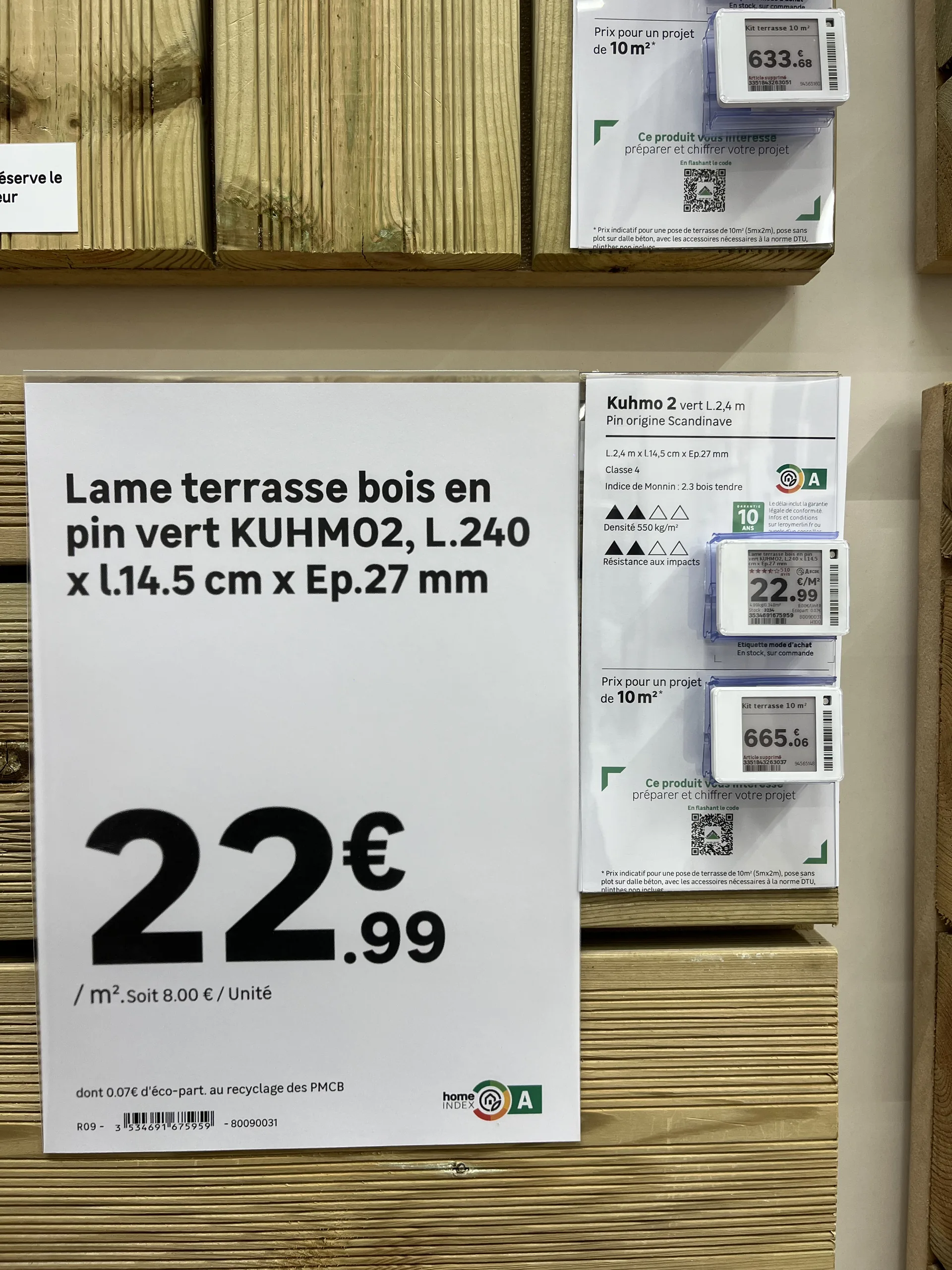
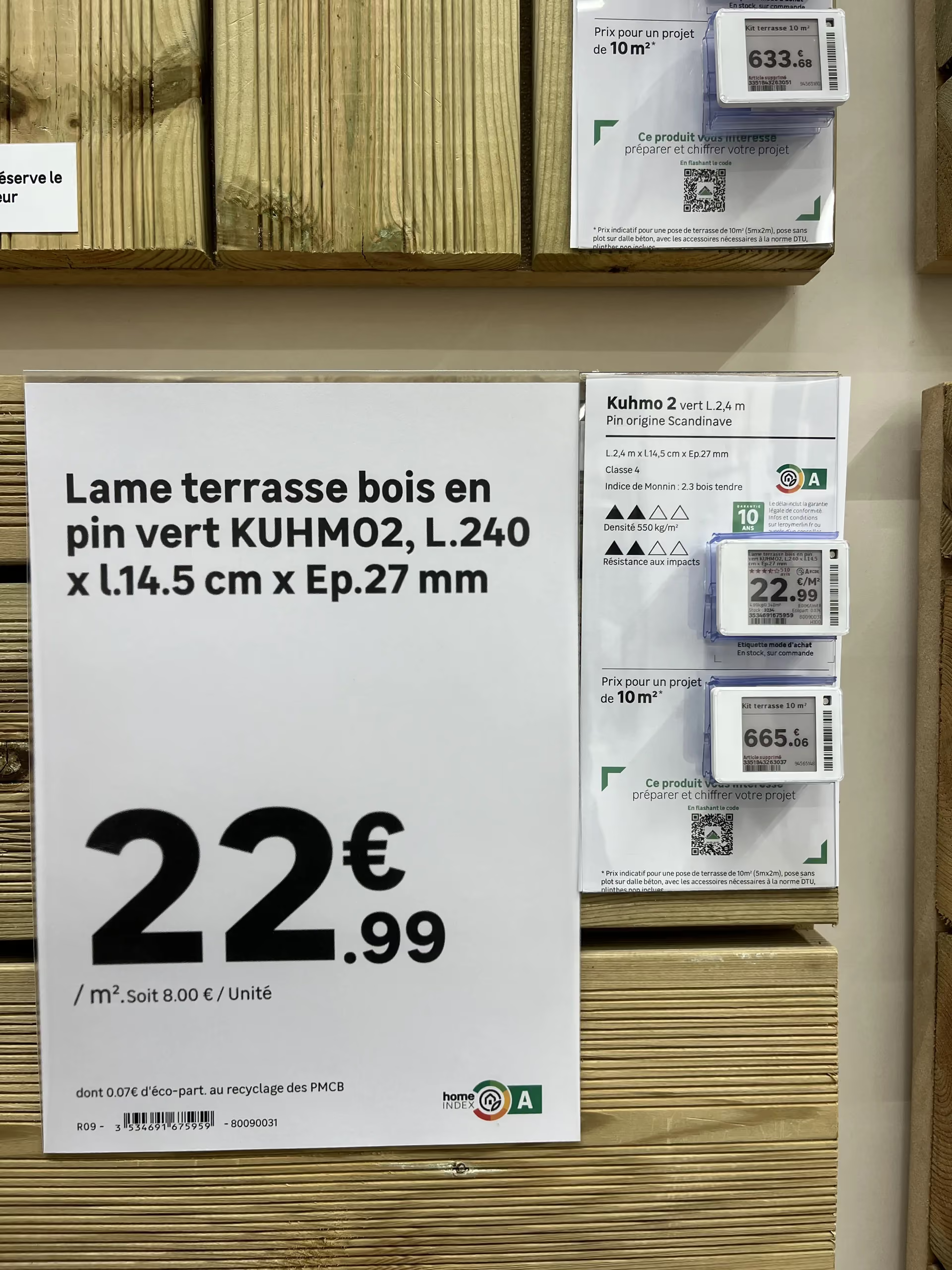
Affiche papier détaillant les dimensions et le prix au mètre carré d'une lame de terrasse, à côté de fiches produit avec étiquettes électroniques
Automatically generated paper sign and electronic labels side by side: same brand guidelines, same data.

A side-by-side comparison, criterion by criterion

Criterion
Electronic shelf label
Paper label and poster
Upfront cost
Electronic shelf labelHigh: labels, infrastructure and integration
PaperLow: printers and consumables
Price change
Electronic shelf labelRemote, within moments, with no action on the shelf (initial installation is still manual)
PaperEach item is printed then put up; both can be automated if the tool is connected to the data
Information displayed
Electronic shelf labelPrice and a few lines, small format
PaperUnlimited: photos, specifications, detailed mentions
Visibility
Electronic shelf labelRead up close, on the shelf edge
PaperAll formats, up to posters visible from a distance
Risk of mismatch with the till
Electronic shelf labelLow, the price comes straight from the system
PaperLow if the sign is generated from the data; real if it is re-keyed
Large formats (A5 to A2, shelf strips)
Electronic shelf labelVery expensive across a whole estate
PaperAffordable, any format
Damp or outdoor areas
Electronic shelf labelDifficult to install and maintain
PaperSuitable with a weather-resistant medium
Best use
Electronic shelf labelEveryday price on small formats with frequent price changes
PaperPromotions, large formats, product sheets, garden centres, outdoor areas
Qualitative comparison, for guidance only. Costs and uses vary with network size, the aisles concerned and the hardware chosen.

No single medium wins on every criterion. The choice depends on the location, format, and usage.

What electronic labels really bring to the table

The distinct advantage of electronic labels is clear: when a price changes, there are no more labels to print or place. Updates happen remotely in seconds across all relevant labels. On shelves where prices change frequently, this gain in time and responsiveness is real.
However, it must be measured precisely. The initial shelf placement remains manual: each label must be installed and associated with the correct product, just like a paper label. And the investment (labels, communication infrastructure, integration) is not always justified by this gain alone, especially in aisles where prices rarely change.

Where paper remains the best choice

Large formats. As soon as the medium exceeds the size of a small shelf-edge label (A5, A4, A3, A2, large strips), electronic equivalents become very expensive at scale. For promotional signs and aisle signage, paper remains by far the most accessible solution.
Humid or outdoor environments.
Garden centers, lumber yards, and areas exposed to the elements: electronic labels are difficult to install and maintain there. Paper, on a suitable holder, is much better suited for these conditions.
Detailed information.
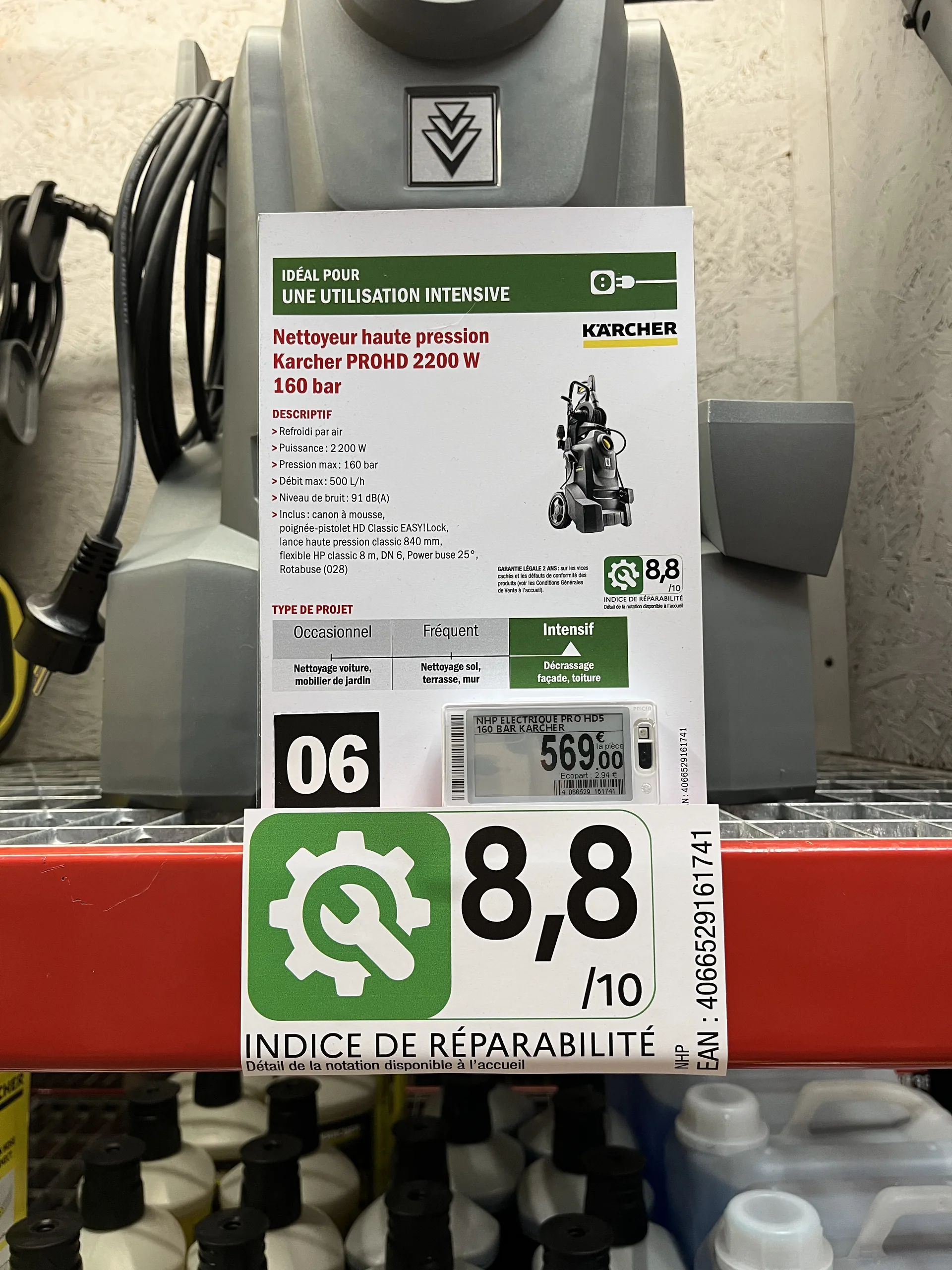
Technical specifications, icons, photos, and regulatory information like eco-participation fees or repairability scores: an electronic label screen cannot display everything. A paper sheet can.

Fiche produit papier d'un nettoyeur haute pression avec indice de réparabilité, au-dessus d'une étiquette électronique
Features, recommended usage, and repairability score on paper; price on the electronic label.

Visibility. A promotional sign is seen from a distance and triggers a purchase. A shelf-edge label is read up close.

Choose format by format, not store by store

Rather than a total overhaul, the right approach is to decide on a case-by-case basis, depending on:

  • Product placement : shelf edge, end cap, aisle, outdoor.
  • Store type : supermarket, convenience store, garden center, building supply store.
  • Format : small price tag, shelf strip, A4 or A3 poster, large format.
  • The choice of the store itself, especially in a franchise network: some stores prefer to invest in electronics, while others want to maximize the return on their existing printer fleet.

This is what most retailers supported by PiiVO do in the home improvement, furniture, and appliance sectors: electronic shelf labels for some shelves, paper for promotions, large formats, and technical products, often within the same aisle.

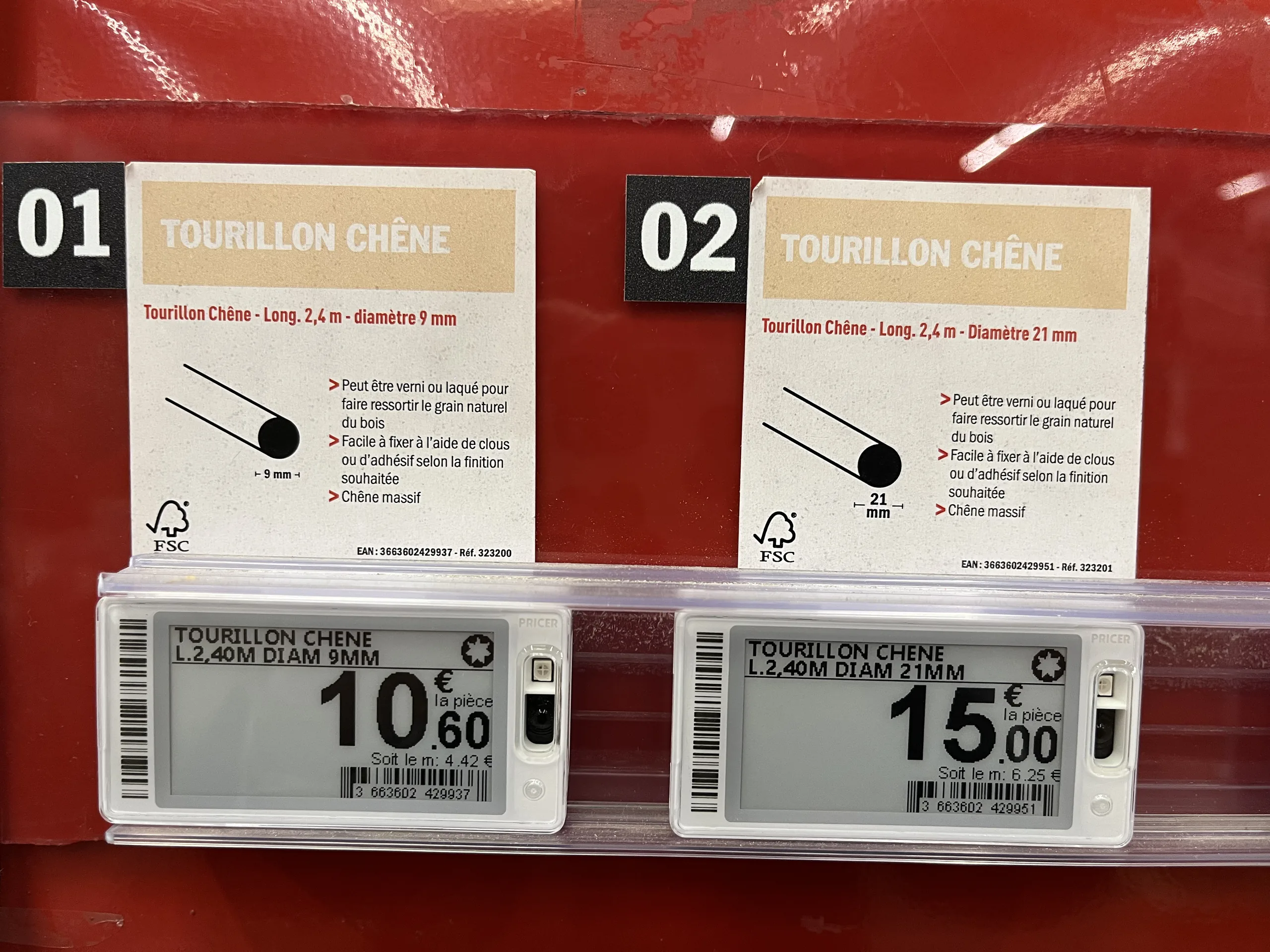
Fiches produit papier illustrées au-dessus d'étiquettes électroniques de gondole dans un rayon de tourillons en chêne
The paper sheet explains the product, while the electronic label displays the price.

Maintaining the same benefits, regardless of the medium

To ensure this remains a simple choice of medium rather than a change in method, both must be managed in the same way. This is the principle behind a hybrid signage creation platform like PiiVO POSter :

  • The same data : prices from the ERP, specifications from the PIM, and visuals from the DAM, for both paper and electronic formats.
  • The same brand identity : templates defined at headquarters and applied automatically, regardless of the format.
  • The same time savings : automatic or bulk creation, without re-entry, with direct in-store printing.

PiiVO is software: it sells neither electronic shelf labels nor printers, and works with the hardware chosen by the retailer. Several retailers fully equipped with paper have been able to automate their signage without committing to the investment of an electronic fleet, while keeping the option to switch to electronic where it makes sense.
Conversely, PiiVO can also feed electronic shelf labels directly. A home improvement retailer has been using this hybrid connection since 2026, with a gradual rollout underway in its stores: a single platform manages both paper signage and electronic labels. To learn more, see our article on how toautomate price label creation.

How to choose for your stores: 5 questions to ask yourself

  1. How often do your prices change, aisle by aisle? Electronic labels are primarily justified where prices change frequently.
  2. What formats do you use? The larger the signage, the more paper retains the cost advantage.
  3. Do your stores have humid or outdoor areas? Garden centers and lumber yards are still better served by paper.
  4. Do all your stores have the same needs? In a franchise network, each store can make a different choice.
  5. Is your paper signage already connected to your data? If not, that is the first priority: it provides a large portion of the expected benefits of electronic labels without changing the medium.

In summary

Electronic and paper labels are not mutually exclusive. Electronic labels provide remote price updates; paper retains the advantage for large formats, promotions, detailed information, and harsh environments. The choice is made format by format, depending on the location, store type, and the preference of each point of sale.
The most important thing lies elsewhere: it is the connection to data and automation that determine the quality of signage, not the medium. With a platform that manages both, the choice between paper and electronic becomes a tactical decision, not a process revolution.

‍

‍

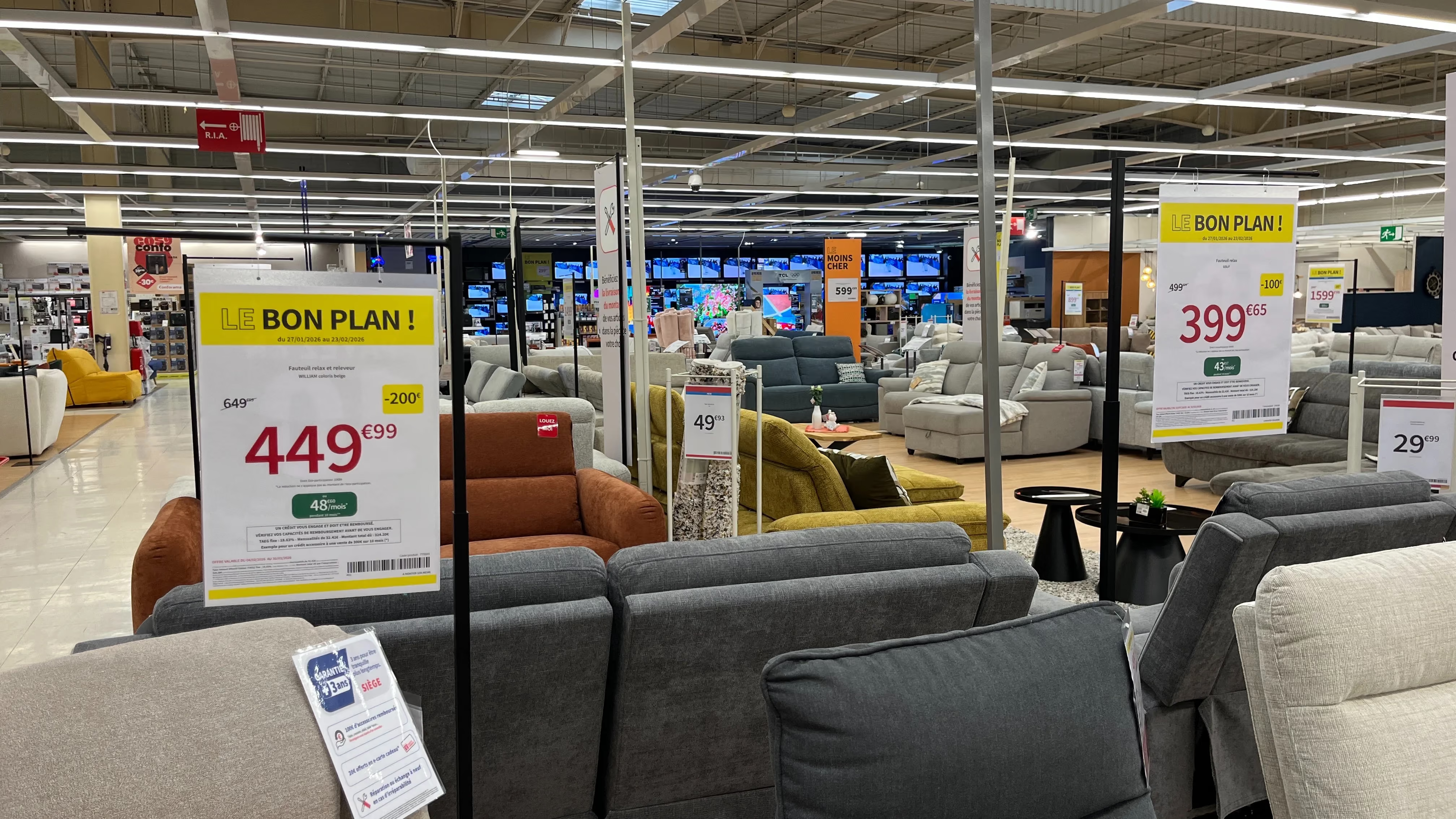
Affiches prix promotionnelles suspendues dans un rayon de canapés, avec prix barré, remise et mensualité de financement
Omnichannel consistency
Large corporations

From product data to print: how to automate label creation

Behind every price tag lies a chain of information that travels from head office systems to the store shelf. Discover how to connect your ERP, PIM, and DAM to your signage creation process to produce accurate labels in bulk and automatically push them to printers and electronic shelf labels.

00

min read

How can you automate the creation of in-store price labels and signs? By connecting your signage creation tool to your retail systems (ERP, PIM, DAM, POS, e-commerce site). Price, product name, specifications, and mandatory information are pulled directly from the source, the correct template is selected automatically, and the sign is sent to the printer or electronic shelf label—with no manual re-entry required.

A price tag seems simple. A price, a product name, a few details. Yet, behind every sign placed on a shelf, there is a chain of information that starts at head office and must reach the customer intact.
As long as this chain relies on manual re-entry, it will break regularly. Automation is precisely about eliminating these gaps: product data feeds the sign directly, from start to finish. Here is how it works in practice, step by step.

The real problem: information re-entered at every stage

In a manual workflow, product information is copied multiple times before it reaches the shelf. The price is defined in one system, the name in another, and the specifications in a third. In-store, a team member then pulls it all together to create the sign.
Every time information is copied, there is a risk of error: a transposed digit, a unit of measure that differs from head office guidelines, a missing mandatory notice, or a promotional price that is no longer valid. These discrepancies aren't due to a lack of diligence; they are inherent to the process itself.
The solution, therefore, is not to copy more carefully. It is to stop copying altogether.

Where does sign data come from?

A complete price sign draws on information from several retail systems. Connecting your signage tool to these sources allows you to pull each piece of data from its authoritative source.

System
What it provides
What appears on the sign
ERP
What it providesPrices, promotions, validity dates
On the signDisplayed price, was-price, discount, offer period
PIM
What it providesProduct name, specifications, product family
On the signProduct title, technical sheet, regulatory pictograms
DAM
What it providesProduct images, brand logos
On the signProduct photo, logo
Till system
What it providesPrice actually charged
On the signConsistency between shelf and till
E-commerce site
What it providesOffer published online
On the signConsistency between store and website
Typical role of each system, for guidance only. The exact split of data varies with each retailer's own set-up.

The principle is always the same: each piece of information is read from its reference system and then automatically assembled onto the sign. This ensures the price on the shelf matches the price in the system, and the store presents the same offer as the website.

How data becomes a sign, in three steps

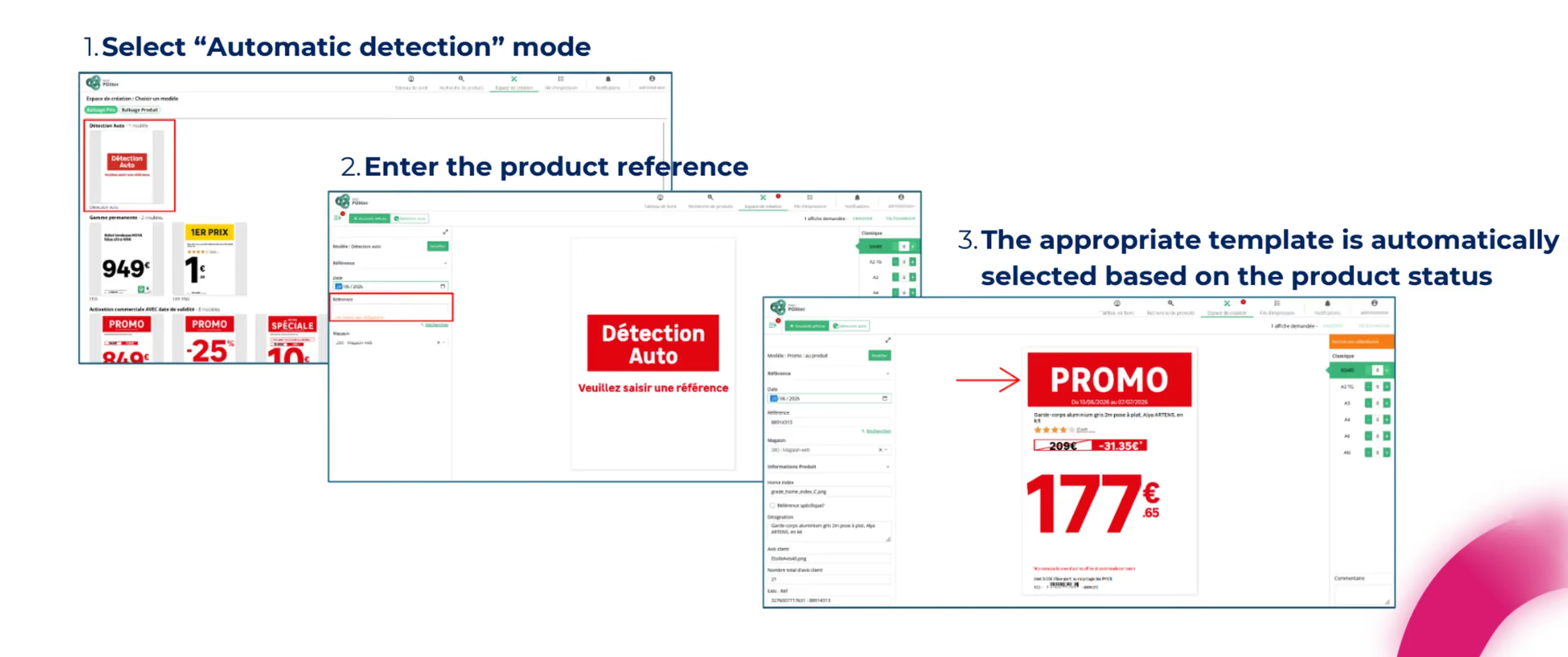
To create a data-connected sign, team members no longer need to design anything. The process takes just three steps.

  1. They select the automatic detection mode. Instead of choosing a sign template themselves, they let the platform decide.
  2. They enter the product reference. This is the only information they need to provide.
  3. The appropriate template is selected automatically based on the product's status. Promotional products are assigned a promotional template, new arrivals get an arrival template, and permanent prices use a standard template. The sign is generated with all up-to-date data.
Three steps to create a price sign automatically from a product reference
The team member selects automatic detection, enters a reference, and the template matching the product status is applied.

Head office maintains a centralized view of all print jobs, can send print requests to stores, and provide them with files created by agencies.

What automation calculates for you

Beyond simply pulling data, the platform handles calculations and decisions that are common sources of manual error:

  • Price type, whether permanent, promotional, discounted, or entry-level.
  • Discount calculations, in both absolute amounts and percentages.
  • Sales unit and unit price, such as price per liter or per kilo, selected based on the product or its category.
  • Promotional campaign affiliation, including validity dates.
  • Technical specifications and regulatory icons, populated automatically based on the product category.
  • Language, automatically adapted to the user's store within an international network.

These are precisely the types of calculations where an error easily goes unnoticed during creation, but stands out to the customer on the shelf.

From single items to mass creation

Creating one sign at a time is fine for occasional needs. For a sales event, you need to produce hundreds or even thousands of materials.

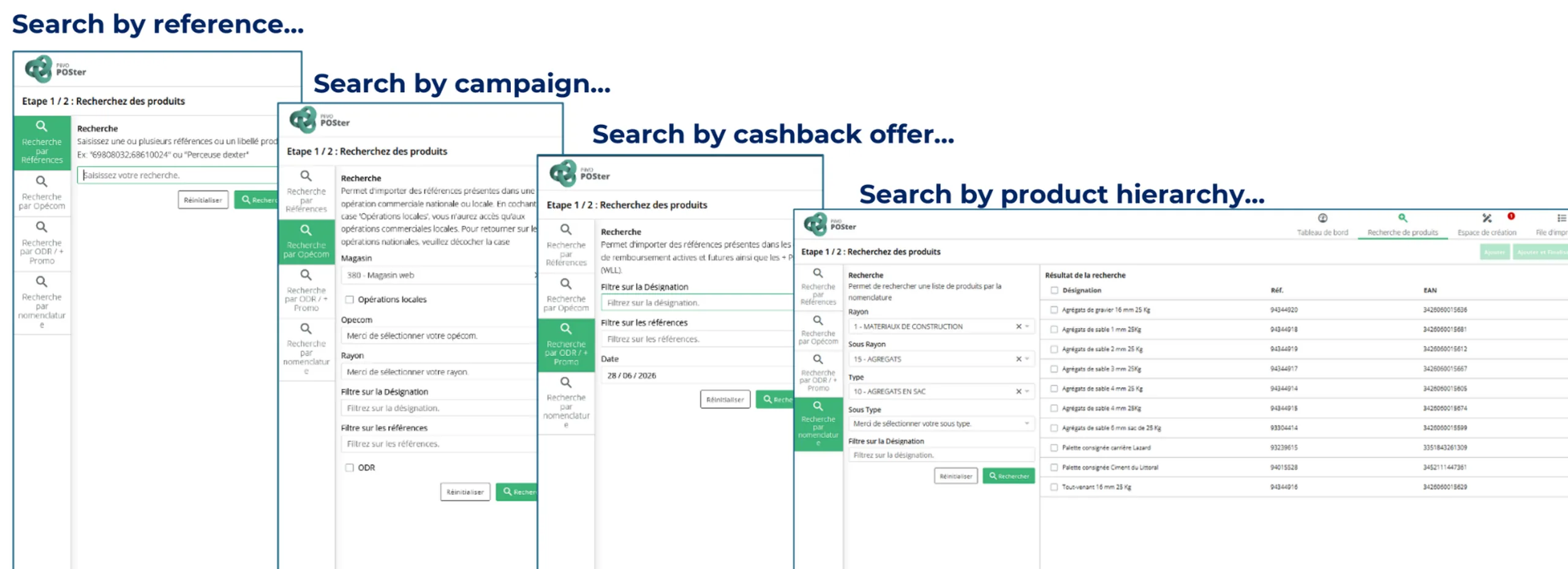
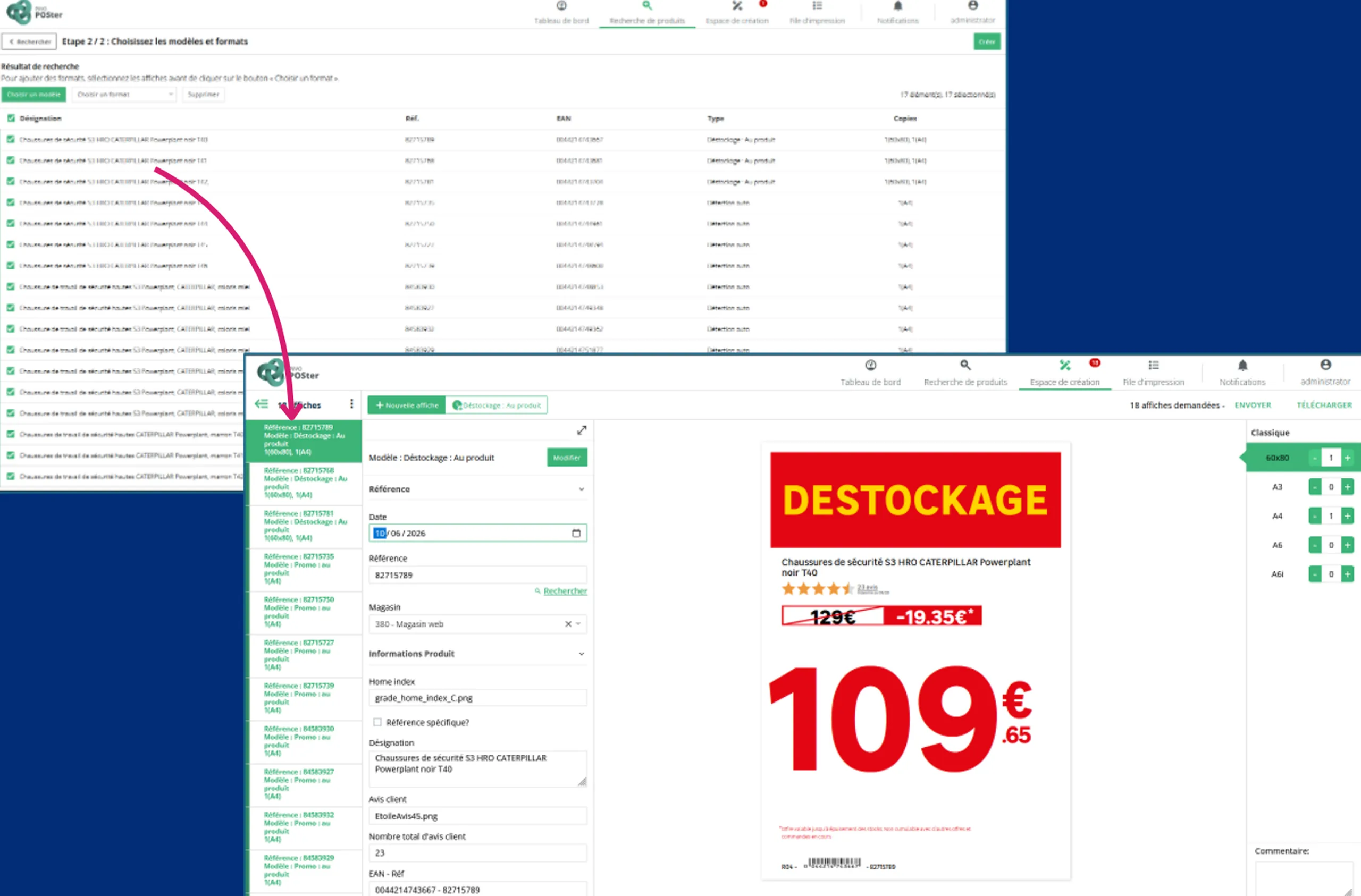
Bulk creation begins by searching for products based on several criteria: by reference, campaign, rebate offer, or nomenclature. Search filters can be customized to match the retailer's organization. Once products are selected, simply choose the templates and formats to generate up to 1,000 displays in a single operation.

Product search screens by reference, campaign, cashback offer and product hierarchy

Multi-criteria search, the starting point for bulk creation.

List of selected products and a sign generated automatically during bulk creation

The selected products, and the signs generated in a single run.

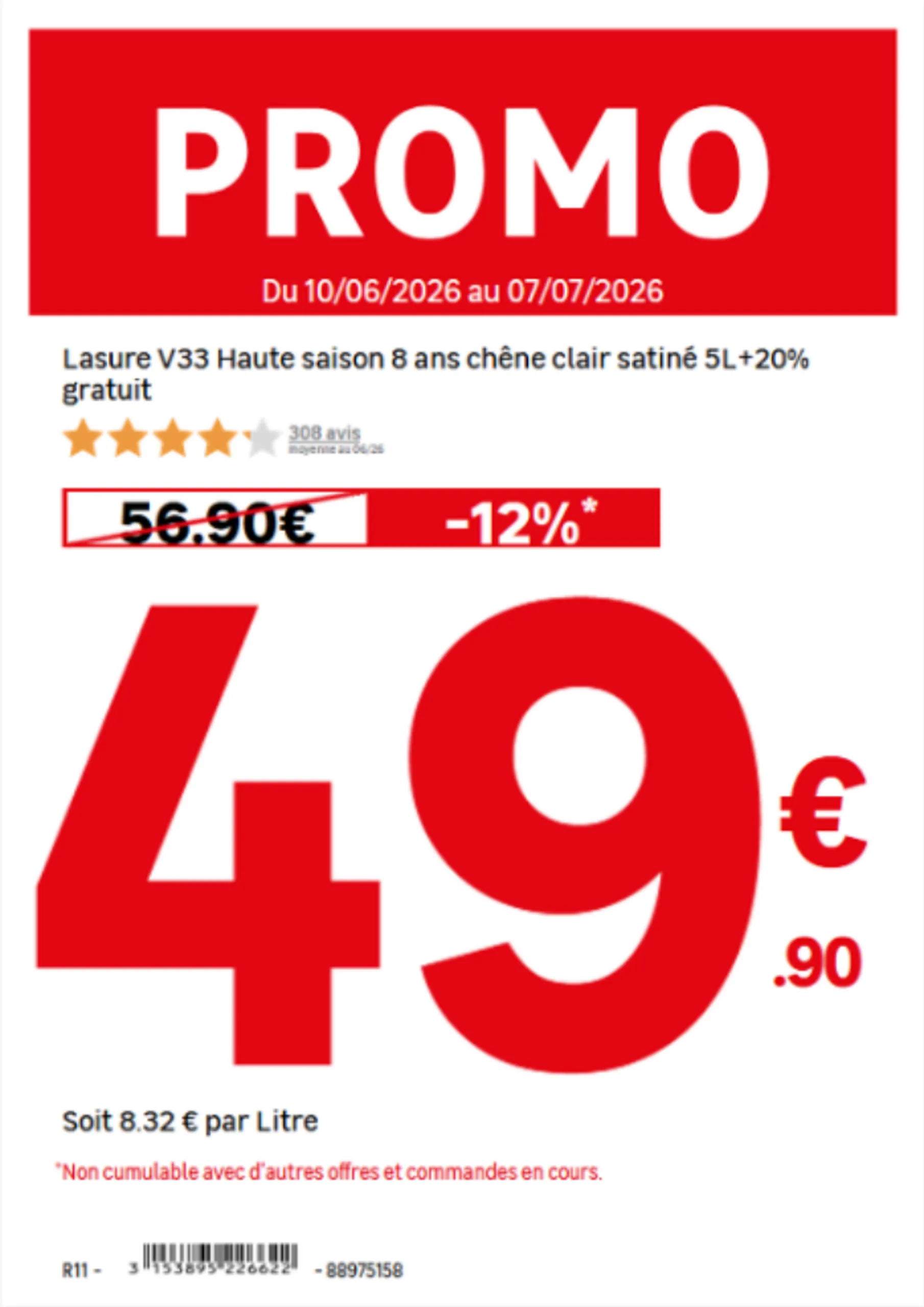
Promotional price sign automatically showing the price per litre

The unit of measure is chosen automatically according to the product.

Product technical sheet with specifications and pictograms filled in automatically

Specifications and pictograms are filled in according to the product family.

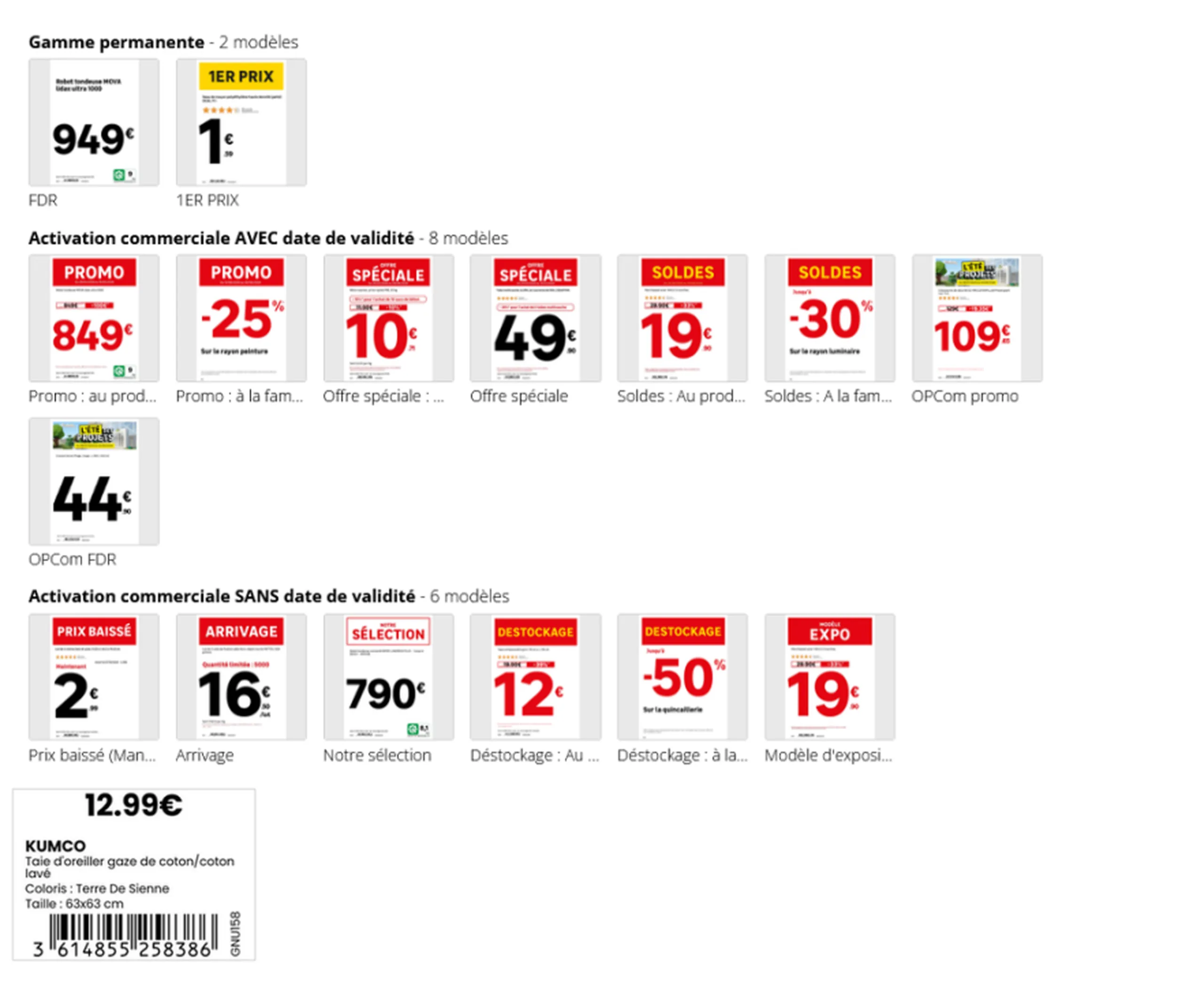
Catalogue of price sign templates for core range and promotional campaigns

One template per commercial situation, applied automatically.

Across a network during peak periods, these operations multiply. During Black Friday, all participating retailers can generate over 220,000 posters in a single day, by aggregating operations from all stores.

From poster to shelf: automated distribution

Producing the poster is not enough; it must also reach the right place in the right format. This is the final step to automate.
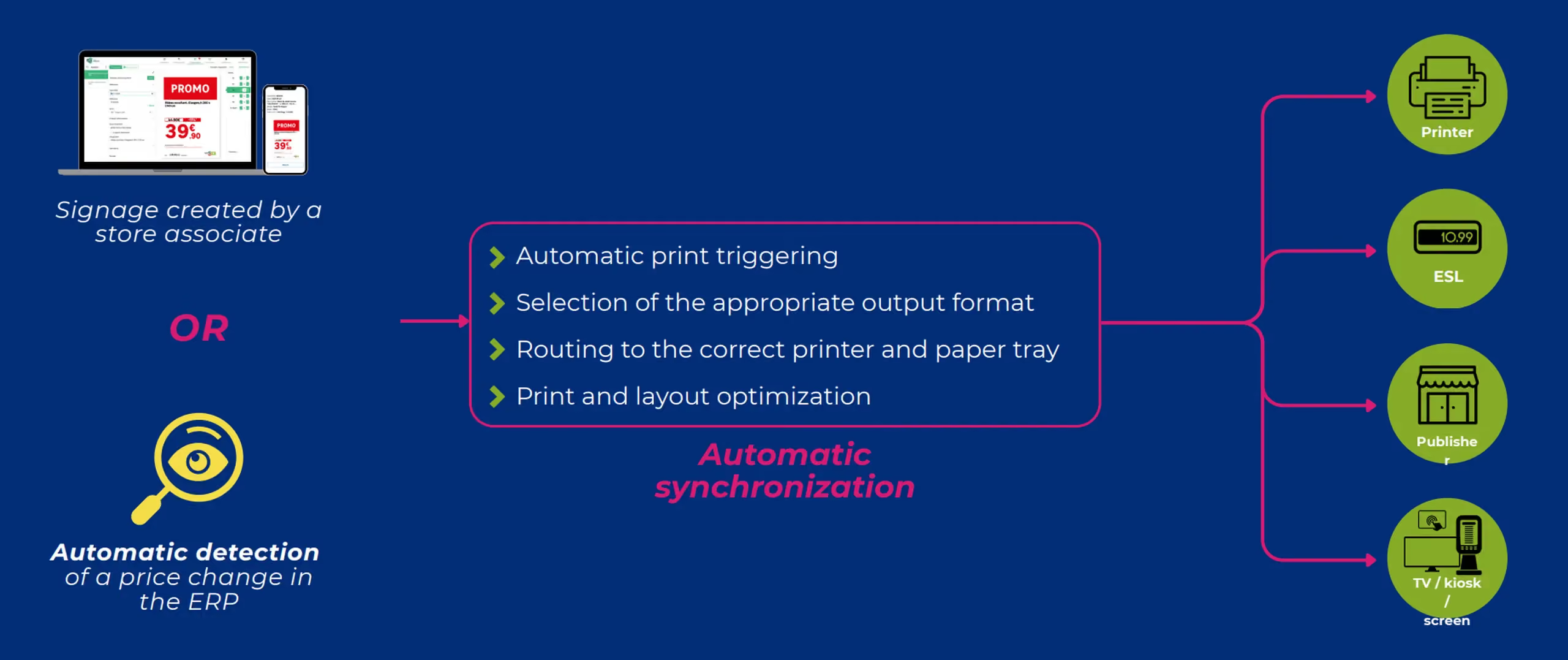
The process can be triggered from two sources: a staff member creating the poster in-store, or the automatic detection of a price change in the ERP. In both cases, the following steps occur without intervention:

  • Printing is triggered automatically, or the appropriate output format is selected.
  • The document is routed to the correct printer and paper tray.
  • Printing and layout are optimized.
  • Electronic shelf labels are updated at the same time as paper materials.
Diagram of automatic sign distribution, from a price change to printers, electronic shelf labels and screens
A price change in the ERP is enough to trigger updates to every affected display.

Meanwhile, headquarters maintains a centralized view of all print jobs, can send print requests to stores, and provide them with files created by agencies.

In the field: print directly from the aisle

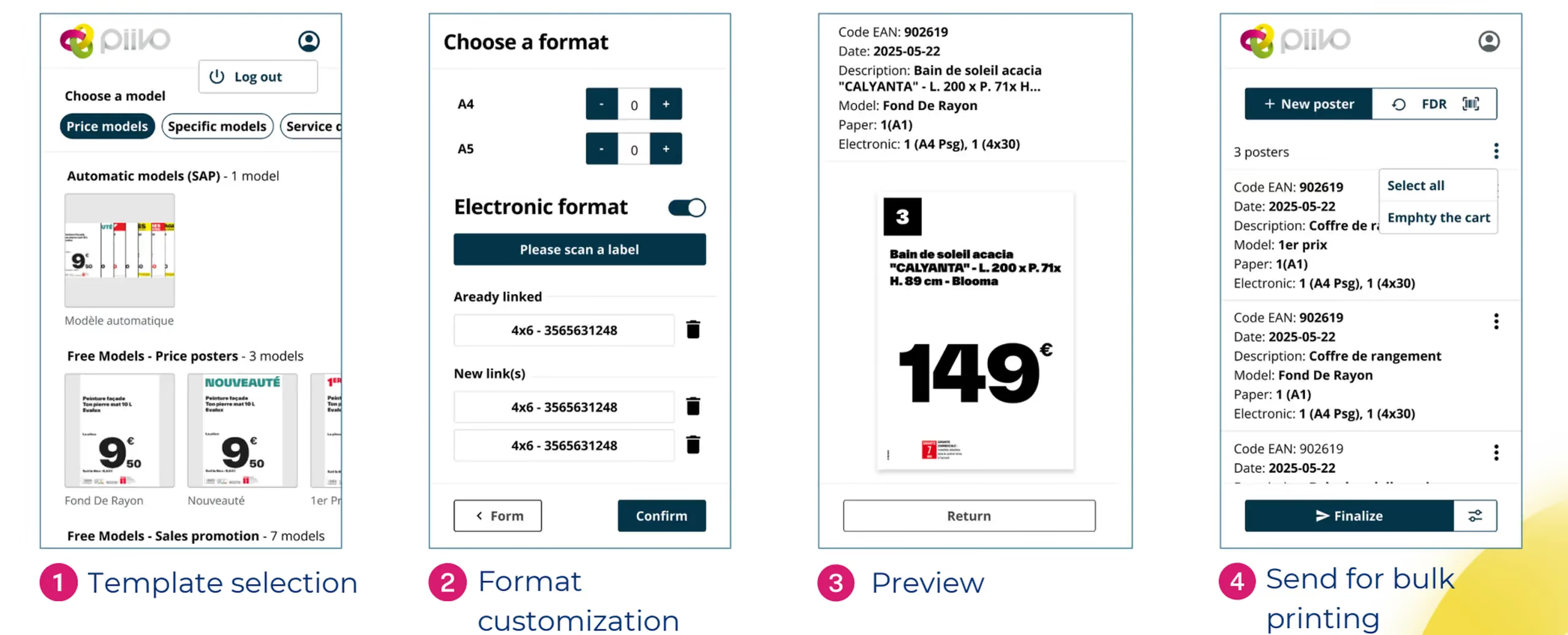
Not everything is decided at headquarters. In-store, a staff member notices a missing label, a price to correct, or a product to highlight. The mobile app allows them to take immediate action in four steps: select the template, customize the format, check the preview, and send to print, even in bulk.

Four mobile app screens for creating and printing a price sign from the shop floor
Select a template, choose the format, preview, then send to print, without leaving the shop floor.

What this changes in practice

Eliminating manual data entry transforms in-store signage in three key ways.

Reliability. The displayed price matches the recorded price, mandatory information is included, and units are consistent. Signage is compliant with brand guidelines by design, as all materials are generated from the same templates.

Network consistency. Every store displays the same information, in the same format, at the same time. Customers find exactly what they saw online reflected on the shelf.

Staff time. Regarding signage tasks, one retail chain reports a time saving of approximately half. This time is reinvested into sales and customer service.

Affiche prix en rayon affichant les dimensions d'un produit, à côté d'une étiquette électronique
The result on the shelf: product specifications, pulled directly from the source, are displayed without manual entry, ensuring perfect alignment with electronic shelf labels.

In summary

Automating label creation isn't just about producing the same materials faster. It’s about ensuring product data flows seamlessly from the master system all the way to the shelf.
‍
Connecting to data sources, automatically selecting the right template, handling calculations, and pushing updates to printers and electronic shelf labels: every step eliminates a potential for error. The result is accurate, network-wide consistent signage, and staff freed up for what matters most: the customer.

‍